

Most camps don't fail at technology adoption because they picked the wrong product. They fail because they picked the wrong moment — flipping a switch three weeks before opening day, or migrating registration data while families are mid-checkout. The seasonal rhythm is what everyone underestimates. A year-round business can roll out software gradually and absorb a bad week. A camp running 6–10 sessions across a 9-week window doesn't have that cushion. One botched cutover during peak registration and you're reconciling payments by hand into August.
So this isn't a "how to choose software" article. If you're still in evaluation mode, the camp management SaaS buyer's checklist and RFP template covers that ground. This is about the part nobody writes down: the operational, non-technical rollout. Sequencing. Freeze windows. Who's allowed to touch what. How you test before you trust it. And how you back out when something goes sideways — because sometimes it will.
The directors who get this right treat a rollout like they treat a session: scripted, staffed, with checkpoints and a plan for when a kid gets homesick on night two.
Why seasonal rollouts break differently than normal software launches
In a typical business, adoption friction shows up as slow uptake. People drag their feet, keep using the old spreadsheet, and eventually the new tool wins. Annoying, but survivable.
Camps don't get a slow-uptake problem. They get a collision problem. The pattern repeats constantly: a camp buys a new registration or ops platform in February, the vendor promises an easy migration, everyone assumes it'll be live "before summer." Then March registration opens, the data's half-moved, counselors are being hired, and suddenly three systems are all partially true at once. The old system has last year's families. The new one has this year's deposits. A shared spreadsheet has the actual current waitlist. Nobody knows which one to trust.
-
The registration window and the rollout window overlap. Camps buy in the off-season but go live right as the money starts moving. The highest-stakes financial period becomes the testing period by accident.
-
Staff turnover resets institutional memory every year. Whatever you taught last summer's team about the old system walks out the door in August. Every rollout is also an onboarding problem.
-
There's no slack in the calendar. A retail store can have a rough Tuesday. A camp's "rough Tuesday" is opening day, and 180 parents are in the parking lot.
-
Data is deeply interconnected. Registration feeds rosters, rosters feed cabin assignments, cabins feed activity rotations, activities feed staffing. Touch one system and four downstream things wobble.
If your data model is already shaky before you start — mismatched family records, duplicate campers, health forms living in a separate tool — a rollout will expose every one of those cracks. Worth reading why your registration system might be lying to you before you sequence anything, because you can't cut over data you don't actually trust.
Sequence the rollout to your session cadence, not the calendar
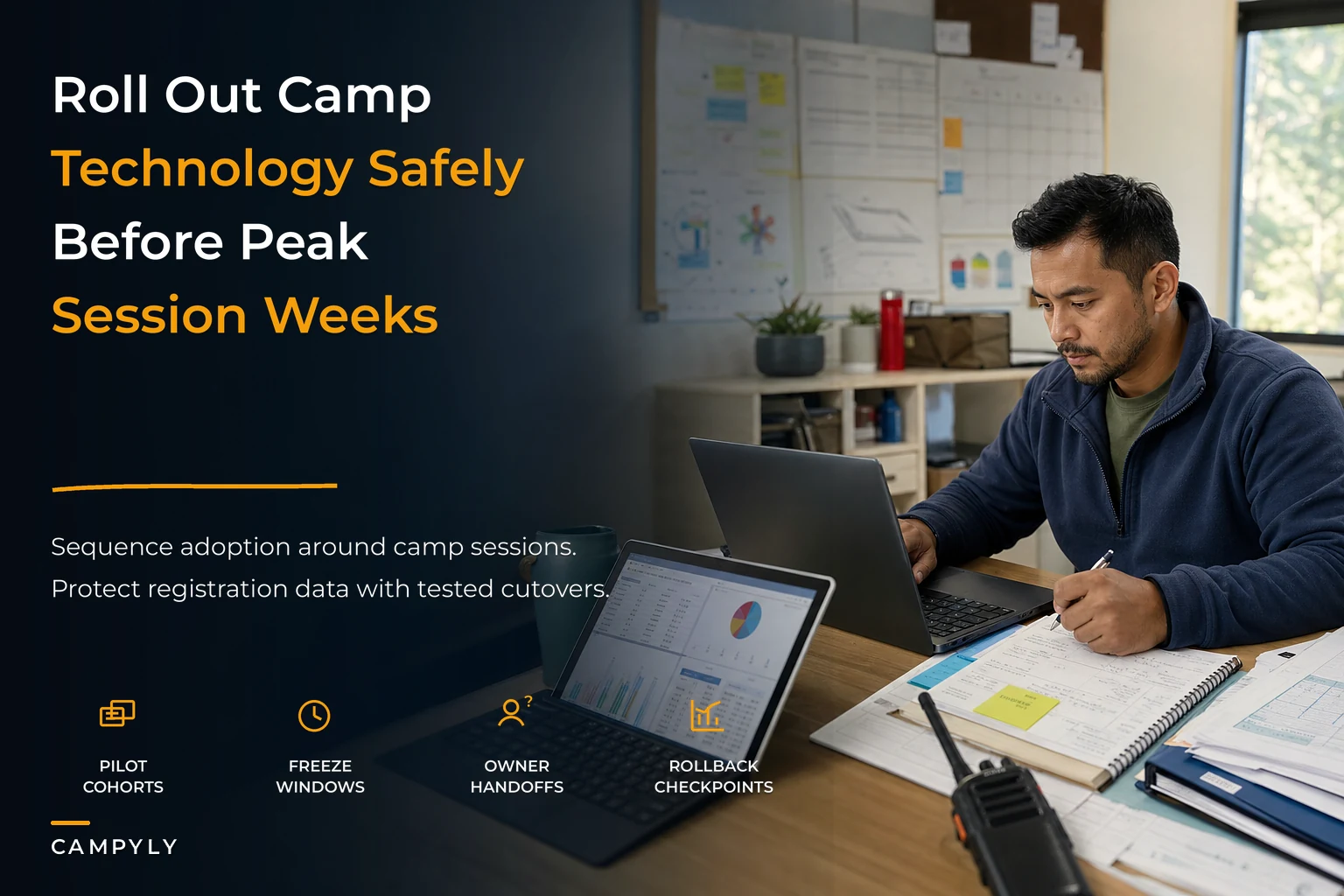
The single biggest mindset shift: stop thinking in dates, start thinking in cadence. Your sessions have a natural rhythm — registration opens, deposits land, a form-completion crunch happens about two weeks out, check-in day, mid-session, checkout. Your rollout should land in the quiet pockets of that rhythm, not get jammed into the busy ones.
Simplify camp operations with centralized control.
Campyly empowers you to manage registrations, staff, and activities seamlessly—all from one platform.
- Integrated camper and staff management
- Automated notifications and alerts
- Dynamic scheduling and resource allocation
No credit card required
A workable sequence for most seasonal programs:
-
Off-season foundation (12+ weeks before registration opens). Core setup, data modeling, integrations configured. Nothing customer-facing yet. This is where migration rehearsals happen — more on that below.
-
Internal-only pilot (8–10 weeks out). The office team runs real workflows on the new system using last year's data as a sandbox. No live families touched. You're testing whether the thing actually does what the demo promised.
-
Registration cutover (the hard line). Pick one clean moment — usually the night before registration opens — where the new system becomes the single source of truth for new sign-ups. Before this line, old system. After, new system. No overlap period where both accept registrations.
-
Operational modules go live by session proximity. Cabin assignment, activity rotation, and daily ops tools don't need to launch at registration. Bring them online in the weeks before your first session, after registration pressure eases.
-
Per-session reinforcement. Each session is a chance to tighten the workflow. By session three, your staff should be running it without the cheat sheet.
The mistake here is launching everything at once because "we already paid for it." You don't need the activity rotation module live in March. Decoupling registration from operations gives you two smaller, survivable launches instead of one giant one. And if you're building activity rotations, the schedule data model and conflict-free rotation templates will matter more at step 4 than anything you do at step 1.
Freeze windows and owner rules: the part that actually prevents chaos
The discipline that separates clean rollouts from messy ones — and almost nobody does it — is data freezes with named owners.
A freeze window is a defined period where nobody edits a particular dataset except one designated person. During a migration, you cannot have five staff still editing family records in the old system while you're copying those records into the new one. Every edit during an un-frozen migration becomes a record that's wrong in the destination, and you won't find it until a parent calls.
A simple freeze structure
| Phase | What's frozen | Who can write | Duration |
|---|---|---|---|
| Pre-migration snapshot | Old system family + payment data | Nobody (read-only) | 24–48 hrs |
| Migration execution | Both systems | Migration owner only | The cutover window |
| Verification | New system | Verification owner only | Until sign-off |
| Go-live | New system open | Normal roles restored | — |
The owner rule matters just as much: every major dataset and module has exactly one person accountable for it during rollout. One owner for financial/payment data. One for rosters and family records. One for health and consent forms. One for scheduling. When something looks wrong, there's no "I thought you were handling that" — there's a name.
Use clear, timestamped snapshot filenames so you can restore the exact cut if you need to revert.
Camps that assign owners by module recover from mistakes noticeably faster than camps where "the director handles tech." Diffused ownership means diffused blame means slow fixes. During a cutover, speed of correction is everything.
The acceptance test matrix: proving it works before you trust it
Demos lie. Not maliciously — vendors show you the clean path. Your acceptance testing exists to find the ugly paths: the sibling discount that doesn't calculate, the health form that doesn't attach to the right camper, the refund that double-posts.
An acceptance test matrix is a structured list of "can the system actually do this real thing we need, with real-looking data?" You run each test, mark pass/fail, and you do not go live until the critical ones pass.
Acceptance test template (adapt the rows to your program)
| Test ID | Workflow | Test input | Expected result | Priority | Pass/Fail | Owner |
|---|---|---|---|---|---|---|
| REG-01 | New family registration | Full sign-up, 2 campers | Both campers enrolled, one invoice | Critical | ||
| REG-02 | Sibling discount | 2nd camper same family | Discount auto-applied correctly | Critical | ||
| PAY-01 | Deposit + balance | Partial payment | Balance reflects, no double-charge | Critical | ||
| PAY-02 | Refund/cancellation | Cancel enrolled camper | Correct prorate, credit issued | Critical | ||
| FORM-01 | Health form attach | Upload to camper record | Form visible to med staff only | Critical | ||
| ROST-01 | Roster generation | Pull session roster | Matches paid enrollments exactly | High | ||
| CABIN-01 | Cabin assignment | Assign with gender/age rules | No rule violations | High | ||
| COMM-01 | Parent email send | Session-wide message | Reaches all current families | Medium |
The rule that makes this work: a critical test failure is a stop-the-line event. You don't launch registration with a broken payment flow and plan to fix it next week. Next week is live families losing money. Mark critical tests as hard gates.
One overlooked test category: reconciliation. Can you pull a report from the new system that matches what your bank actually received? More than a few camps have gone live with a system that enrolled everyone perfectly but couldn't produce a payment report that tied out to the merchant deposits. That's a month of accounting pain you find in September.
Pilot cohort scripts: test with real humans, carefully
Before you open to the full family base, run a small pilot cohort — a controlled group that goes through the real workflow so you catch problems at a survivable scale.
Good pilot candidates, in order of safety:
-
Your own staff registering fake families (zero risk, catches obvious breaks)
-
Returning families you know personally (forgiving, will tell you honestly what's confusing)
-
A single early session's worth of families (real volume, contained blast radius)
The script for a family-facing pilot should be explicit, because confused pilot families generate support calls that eat your week:
-
Send a short heads-up
"You're among the first using our new registration — here's what to expect, here's who to text if anything's weird."
-
Give them a direct human contact, not a general inbox. Pilots need fast answers.
-
Watch where they stall. If three of eight pilot families get stuck on the same screen, that's your real training gap, not a one-off.
-
Debrief within 48 hours while it's fresh. Ask specifically
where did you hesitate?
What the pilot really tells you isn't "does the software work" — you tested that in acceptance. It tells you where your parents will trip, which is almost never where you expected. A flawless payment flow can still generate a dozen confused calls simply because the confirmation email didn't say the word "receipt," so parents weren't sure they'd actually paid.
Rollback checkpoints: plan the exit before you need it
Nobody wants to talk about rollback because it feels like admitting the project might fail. But a rollback plan isn't pessimism — it's the thing that lets you move faster, because you're not terrified of the point of no return.
A rollback checkpoint is a predefined moment where you ask: "Is this working well enough to continue, or do we revert?" Set these at every phase boundary.
-
A preserved snapshot of the old system. Do not decommission the old platform the moment you go live. Keep it read-only and intact through at least your first full session. If you have to fall back, you need somewhere to fall.
-
Clear revert triggers defined in advance. Decide now what failure looks like. "If payments are mis-posting for more than X% of transactions and we can't fix it within 24 hours, we revert." Deciding this mid-crisis, at 11pm, with angry parents in your inbox, goes badly.
-
A communication script for parents. If you revert, families need a calm, non-alarming message. Pre-write it. "We've temporarily moved registration back to our previous system — your spot is secure, no action needed." You never want to be drafting that under pressure.
The hidden benefit: camps with a real rollback plan actually need it less often. Defining failure triggers forces you to define success criteria too, and that clarity makes the whole rollout tighter.
The data cutover playbook, timed to registration
The cutover is the single riskiest hour of the whole project. A sequence aligned to registration timing that keeps it contained:
-
Rehearse the full migration at least once on a copy. Time it. If the real migration takes six hours, you need to know that before you schedule a two-hour window at midnight.
-
Freeze the old system on your snapshot schedule. Announce the freeze to staff with an exact time.
-
Snapshot everything — export the complete dataset as a static backup before you touch anything.
-
Run the migration during the lowest-traffic window you have. For most camps that's late evening the night before registration opens.
-
Verify against the matrix before unfreezing. Do enrollment counts tie out? Do payment totals match? Spot-check ten real family records field by field.
-
Unfreeze and go live only after the verification owner signs off.
-
Keep the old system read-only for your rollback window.
Here's a quick visual of the cutover workflow.
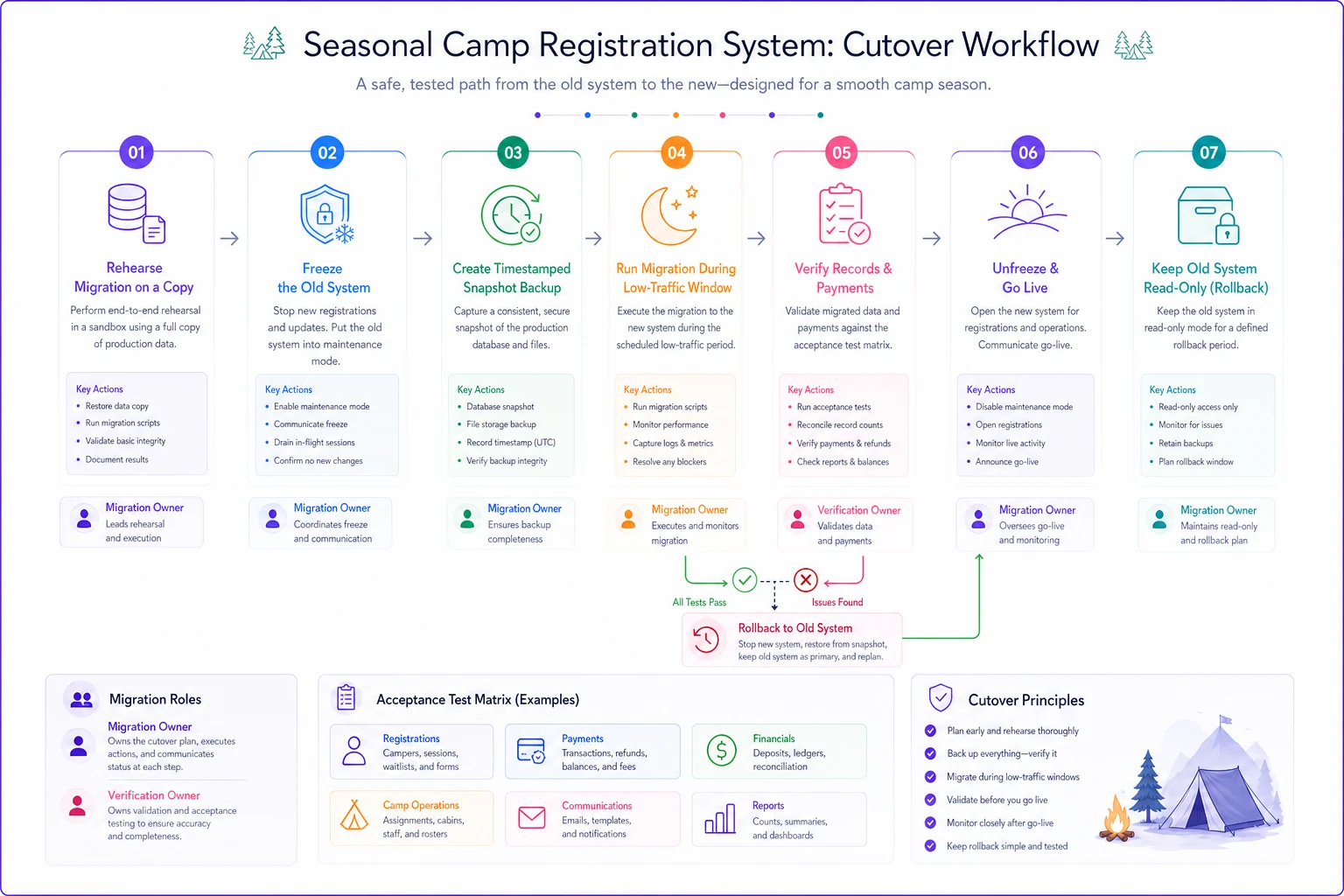
The number that matters most is record parity: the count of campers, families, and dollar totals must match exactly between source and destination. If the old system shows 847 enrolled campers and the new one shows 844, you do not go live. You find those three. They're always three real families, and they'll always be the ones who call.
Staff change-management: scripts that actually land
Technology rollouts die quietly in the gap between "we installed it" and "the team uses it correctly." With seasonal staff, you have days — not months — to build competence, and a fresh crew every year.
-
Role-specific scripts, not system tours. A counselor doesn't need to understand the whole platform. They need: "Here's how you mark attendance. Here's what to do if a kid's not on your list." Three steps, laminated, done.
-
Teach the recovery path, not just the happy path. The most useful thing you can give seasonal staff is "when it doesn't work, do X." Confidence comes from knowing the exit, not from memorizing the system.
-
Name a floor-level go-to person per shift. Not the director. A peer who learned it first. Questions get answered in seconds instead of bottlenecking at the office.
-
Run one live rehearsal before campers arrive. Dry-run check-in with staff playing parents. You'll find your real friction points in about 30 minutes.
A quick change-management script for the all-staff moment: "We switched systems this year to fix [specific pain they remember — late rosters, lost forms, whatever]. It'll feel new for about two days, then it'll be faster than last year. When something breaks, that's expected — flag it to [name], don't work around it silently." That last line matters. Silent workarounds are how a small glitch becomes a season-long data mess.
A real scenario: a mid-sized overnight camp consolidating three tools
A roughly 400-camper overnight program was running registration in one platform, health forms in a second, and cabin/activity scheduling in a sprawl of spreadsheets. Every session, their office spent the better part of a week manually reconciling who'd paid, who'd submitted forms, and who was actually assigned where. Opening days regularly had 15–20 families with some kind of record mismatch.
They consolidated onto a single platform — but the part that made it work was sequencing. Registration cut over in the off-season before sign-ups opened, with a real freeze window and a rehearsed migration. Operational modules didn't go live until six weeks before the first session. They ran a pilot with about 25 returning families and caught a form-attachment bug that would've hit everyone.
First summer on the consolidated setup, opening-day mismatches dropped to a small handful, and the office reclaimed most of that reconciliation week. The bigger win was quieter: staff stopped maintaining shadow spreadsheets because they finally trusted one source of truth. Nothing dramatic — just a program that stopped starting every session in cleanup mode.
When consolidation and rollout make sense — and when they don't
This makes sense when: you're running three or more disconnected tools, your staff maintains shadow spreadsheets to compensate, or you lose real hours every session to reconciliation. The integration tax you're paying is probably bigger than you think once you add up all the manual bridging.
This is a bad idea when: you're inside your registration window right now. Do not start a major cutover with money actively moving. Wait for the off-season. A mid-season rollout to fix a mid-season problem usually creates two problems.
Who should probably wait: a brand-new camp that doesn't yet know its own workflows. You can't consolidate processes you haven't defined. Run a season on something simple first, learn where you actually hurt, then consolidate against real needs instead of guessed ones.
Bringing it together
A seasonal rollout isn't a technology project with a deadline — it's an operational maneuver timed against a calendar that doesn't forgive. The camps that do it cleanly aren't the ones with the best software. They're the ones who sequenced to their session cadence, froze their data with named owners, tested against a real matrix before trusting anything, piloted at small scale, and kept a rollback door open the whole way.
Do the unglamorous parts — the freeze windows, the parity checks, the recovery scripts — and the flashy part, the new system humming along on opening day, takes care of itself. Skip them, and you'll spend August doing by hand exactly the work you bought software to avoid.
Ready to elevate your camp management?
Join 500+ camps using Campyly to save administrative time, enhance camper experiences, and streamline daily operations.