



Most rotation chaos doesn't come from bad planning. It comes from planning in a format that can't catch its own mistakes. A big color-coded grid on a whiteboard looks great until you realize the archery range is booked for two cohorts at the same time, the kayaks are "available" during a slot where they're actually drying out, and your climbing instructor is somehow scheduled in two places on Wednesday.
The fix isn't a prettier grid. It's structuring your schedule as actual data — tables with relationships — so a conflict either can't be entered, or gets flagged the second it happens. This post gives you the exact table schemas (CSV headers and SQL DDL), realistic example records for a multi-day rotation, validation formulas you can drop into a spreadsheet, and a short Python snippet to scan your CSVs for conflicts before campers ever show up.
If you want the planning logic and sequencing strategy behind rotations, the conflict-free activity rotation blueprint for 3–7 day sessions covers that side. This post is the data layer underneath it.
Why spreadsheet grids fail at scale
A rotation matrix — cohorts down the side, time slots across the top — is a view, not a data model. The problem is that the grid flattens everything into one cell. A cell like "Archery — Range 1" quietly contains four separate facts: the activity, the resource, the instructor, and the capacity. When those facts live mashed together in a string, nothing can validate them.
Here's where it breaks in practice. The moment you have:
-
Shared-capacity resources — one lake that canoeing and swimming both pull from, with a combined cap of 40 people in the water.
-
Multi-slot activities — a half-day hike that eats slots 2 and 3, so slot 3 looks "free" in the grid but isn't.
-
Multi-day activities — an overnight trip prep that runs across two days with the same instructor locked in.
…a flat grid can't reason about any of it. You end up manually eyeballing overlaps, and that's exactly where the 8:45am surprise comes from.
The underlying issue: anything you want the system to check has to be its own column. Split your data into proper tables and conflicts become queryable instead of visual.
The five tables you actually need
Five entities cover almost every rotation setup I've run into, from a 60-camper day program to a 400-bed overnight camp:
Simplify camp operations with centralized control.
Campyly empowers you to manage registrations, staff, and activities seamlessly—all from one platform.
- Integrated camper and staff management
- Automated notifications and alerts
- Dynamic scheduling and resource allocation
No credit card required
| Table | What it holds | Why it's separate |
|---|---|---|
| Activities | What campers do (archery, kayaking, arts) | Activities have durations and resource needs independent of when they run |
| Resources | Physical things with limits (ranges, lakes, rooms, kayaks) | Capacity and shared-use lives here, not in the schedule |
| Instructors | Staff who run activities, with certs and availability | One instructor can't be in two slots; certs gate what they can run |
| Cohorts | Groups of campers that move together | Group size drives capacity checks |
| ScheduleEntries | The actual bookings tying all four together per time slot | This is where conflicts are detected |
The key design decision: ScheduleEntries is the only table that knows about time. Everything else is reference data. That separation is what makes validation possible — you check ScheduleEntries against the reference tables.
Table schemas (CSV + SQL DDL)
Below are the headers for each CSV and the matching SQL DDL. The DDL uses SQLite-flavored syntax so it runs almost anywhere with minor tweaks.
Activities
CSV header: activityid,name,defaultdurationslots,requiredresourcetype,mingroup,max_group,notes
CREATE TABLE Activities ( activityid TEXT PRIMARY KEY, name TEXT NOT NULL, defaultdurationslots INTEGER NOT NULL DEFAULT 1, requiredresourcetype TEXT, -- e.g. 'range', 'water', 'indoor' mingroup INTEGER DEFAULT 1, max_group INTEGER, notes TEXT );
defaultdurationslots is the thing most people forget to model. A 2 means the activity blocks two consecutive slots — this is what catches the multi-slot problem later.
Resources
CSV header: resourceid,name,resourcetype,capacity,sharedpool,availablefromslot,availableto_slot
CREATE TABLE Resources ( resourceid TEXT PRIMARY KEY, name TEXT NOT NULL, resourcetype TEXT NOT NULL, capacity INTEGER NOT NULL, sharedpool TEXT, -- resources sharing one real-world limit get the same pool id availablefromslot INTEGER DEFAULT 1, availableto_slot INTEGER );
sharedpool is the field that solves shared-capacity. If your canoes and your swim area both draw from a single 40-person lake limit, give both rows the same sharedpool value (say, LAKE). Validation then sums across the pool instead of per-resource.
Instructors
CSV header: instructorid,name,certifications,availablefromslot,availabletoslot,maxslotsperday
CREATE TABLE Instructors ( instructorid TEXT PRIMARY KEY, name TEXT NOT NULL, certifications TEXT, -- comma-separated: 'lifeguard,archery' availablefromslot INTEGER DEFAULT 1, availabletoslot INTEGER, maxslotsperday INTEGER DEFAULT 6 );
maxslotsper_day matters more than people expect. Burnout and break requirements are real constraints — a counselor running six back-to-back high-energy slots is a scheduling failure even if nothing technically "conflicts."
Cohorts
CSV header: cohortid,name,size,ageband,home_base
CREATE TABLE Cohorts ( cohortid TEXT PRIMARY KEY, name TEXT NOT NULL, size INTEGER NOT NULL, ageband TEXT, home_base TEXT );
ScheduleEntries
CSV header: entryid,day,slot,cohortid,activityid,resourceid,instructorid,durationslots
CREATE TABLE ScheduleEntries ( entryid TEXT PRIMARY KEY, day INTEGER NOT NULL, slot INTEGER NOT NULL, cohortid TEXT NOT NULL REFERENCES Cohorts(cohortid), activityid TEXT NOT NULL REFERENCES Activities(activityid), resourceid TEXT REFERENCES Resources(resourceid), instructorid TEXT REFERENCES Instructors(instructorid), durationslots INTEGER NOT NULL DEFAULT 1 );
One subtle choice: duration_slots lives on the entry, not just the activity. The activity carries a default, but you occasionally override it — a shortened session on a hot day, for example. Storing it per-entry means your conflict checks always use the duration that was actually scheduled, not the assumed one.
Example records for a 5-day rotation
Here's a trimmed but realistic dataset. Four cohorts, a shared lake, a multi-slot hike, and a two-day overnight prep. Slots are 1–6 across a day.
Activities.csv activityid,name,defaultdurationslots,requiredresourcetype,mingroup,max_group,notes A01,Archery,1,range,4,16, A02,Kayaking,1,water,4,12,PFD required A03,Open Swim,1,water,6,30,lifeguard required A04,Day Hike,2,trail,6,20,blocks two slots A05,Arts & Crafts,1,indoor,4,24, A06,Overnight Prep,1,indoor,6,20,runs days 4 and 5
Resources.csv resourceid,name,resourcetype,capacity,sharedpool,availablefromslot,availableto_slot R01,Range 1,range,16,,1,6 R02,Lake - Kayak Dock,water,12,LAKE,2,5 R03,Lake - Swim Area,water,30,LAKE,2,5 R04,Craft Barn,indoor,24,,1,6 R05,North Trail,trail,20,,1,4
Note R02 and R03 both carry shared_pool = LAKE. The actual lake can only hold so many people safely; the pool lets you cap the combined total even though they're separate bookings.
Instructors.csv instructorid,name,certifications,availablefromslot,availabletoslot,maxslotsperday I01,Dana,"archery",1,6,5 I02,Marcus,"lifeguard,kayak",2,5,5 I03,Priya,"arts",1,6,6 I04,Sam,"hike,overnight",1,5,5
Cohorts.csv cohortid,name,size,ageband,home_base C01,Otters,14,8-10,Cabin A C02,Hawks,12,11-13,Cabin B C03,Foxes,18,8-10,Cabin C C04,Bears,10,11-13,Cabin D
ScheduleEntries.csv (Day 1 sample plus the tricky cases) entryid,day,slot,cohortid,activityid,resourceid,instructorid,durationslots E001,1,1,C01,A01,R01,I01,1 E002,1,2,C01,A02,R02,I02,1 E003,1,2,C02,A03,R03,I02,1 E004,1,3,C03,A04,R05,I04,2 E005,1,4,C03,A04,R05,I04,2 E006,2,2,C02,A02,R02,I02,1 E007,4,5,C01,A06,R04,I04,1 E008,5,5,C01,A06,R04,I04,1
A few deliberate landmines are baked in so the validators have something to find. E002 and E003 both use the LAKE pool in day 1 slot 2 — 12 kayak dock seats plus swim, so you'll want to confirm the combined head count stays under the real lake limit. E003 has Marcus lifeguarding swim while also listed as kayak instructor on E002 in the same slot — that's an instructor double-book you want flagged.
Spreadsheet validation with COUNTIFS and SUMIFS
Before touching any code, you can catch most of these in the spreadsheet itself. Put all ScheduleEntries on one sheet and add helper columns.
1. Instructor double-booking — in a column next to each entry: =COUNTIFS($D:$D,"<>"&"",$B:$B,[@day],$C:$C,[@slot],$G:$G,[@instructor_id])
That counts how many entries share the same day, slot, and instructor. Any result >1 is a clash. Wrap it in conditional formatting: highlight the cell red when the value exceeds 1.
2. Resource over-capacity — using SUMIFS to add up cohort sizes against a single resource: =SUMIFS(CohortSize,$B:$B,[@day],$C:$C,[@slot],$F:$F,[@resource_id])
Compare that against the resource's capacity. If it's higher, flag it.
3. Shared-pool over-capacity — this is the one grids consistently miss. Map each resource to its pool, then SUMIFS across the pool: =SUMIFS(CohortSize,$B:$B,[@day],$C:$C,[@slot],PoolColumn,[@pool])
Compare to the pool's real limit (40 for the lake). This is what stops you from having 12 kayakers plus 30 swimmers = 42 in a lake rated for 40.
4. Cohort can't be in two places — same COUNTIFS pattern on cohortid:
=COUNTIFS($B:$B,[@day],$C:$C,[@slot],$E:$E,[@cohortid])
Greater than 1 means that cohort is somehow double-scheduled.
Set all four to conditional-format red on failure. The entire sheet becomes a live error panel — paste in a schedule, and the problems light up immediately.
Python conflict detection on the CSVs
When you've got more than a couple hundred entries, scanning by eye gets unreliable fast. This pandas snippet reads the CSVs and reports the four main conflict types, including multi-slot overlap, which spreadsheets genuinely struggle with.
import pandas as pd entries = pd.readcsv("ScheduleEntries.csv") resources = pd.readcsv("Resources.csv") cohorts = pd.readcsv("Cohorts.csv") # Attach cohort size and resource pool/capacity entries = entries.merge(cohorts[["cohortid", "size"]], on="cohortid", how="left") entries = entries.merge( resources[["resourceid", "capacity", "sharedpool"]], on="resourceid", how="left" ) # Expand multi-slot activities into every slot they occupy rows = [] for , r in entries.iterrows(): for s in range(r.slot, r.slot + int(r.durationslots)): rows.append({**r.todict(), "occupiedslot": s}) occ = pd.DataFrame(rows) problems = [] # 1. Instructor double-booked in a day/slot dupi = (occ.groupby(["day", "occupiedslot", "instructorid"]) .size().resetindex(name="n")) for , r in dupi[dupi.n > 1].iterrows(): problems.append(f"Instructor {r.instructorid} double-booked day {r.day} slot {r.occupiedslot}") # 2. Cohort in two places at once dupc = (occ.groupby(["day", "occupiedslot", "cohortid"]) .size().resetindex(name="n")) for , r in dupc[dupc.n > 1].iterrows(): problems.append(f"Cohort {r.cohortid} double-booked day {r.day} slot {r.occupiedslot}") # 3. Shared-pool capacity exceeded pool = occ.dropna(subset=["sharedpool"]) poolsum = (pool.groupby(["day", "occupiedslot", "sharedpool"])["size"] .sum().resetindex()) POOLLIMITS = {"LAKE": 40} for , r in poolsum.iterrows(): limit = POOLLIMITS.get(r.sharedpool) if limit and r["size"] > limit: problems.append( f"Pool {r.sharedpool} over capacity ({r['size']}/{limit}) " f"day {r.day} slot {r.occupiedslot}") # 4. Single resource over capacity ressum = (occ.groupby(["day", "occupiedslot", "resourceid"]) .agg(total=("size", "sum"), cap=("capacity", "first")) .resetindex()) for , r in ressum[ressum.total > ressum.cap].iterrows(): problems.append( f"Resource {r.resourceid} over capacity ({r.total}/{r.cap}) " f"day {r.day} slot {r.occupiedslot}") print("\n".join(problems) if problems else "No conflicts found.")
The important trick is the slot expansion loop. A 2-slot hike in slot 3 gets expanded into occupancy rows for slots 3 and 4. That's how the check catches an activity accidentally scheduled against the back half of a multi-slot block — the exact thing a flat grid hides.
A real scenario: where this pays off
A mid-size day camp running four weekly cohorts had a recurring Monday problem. Their rotation lived in a shared spreadsheet, and roughly every other week they'd hit a lake conflict mid-morning — kayaking and open swim overlapping past what their waterfront staff could safely cover. The usual fix was pulling a cohort off the water last-minute and scrambling for a backup activity, which meant hunting for an instructor and a space that were both already committed somewhere else.
After splitting the schedule into these five tables and running the pandas check as a pre-session step, the overlaps started getting caught during planning instead of during the activity block. Waterfront conflicts dropped to basically zero across the rest of the season. The bigger win was softer: the waterfront director stopped starting Mondays bracing for a reshuffle.
The whole validation pass took under a minute to run against a week's worth of entries. The numbers weren't dramatic — maybe a handful of avoided scrambles per month — but each one had been eating 20–30 minutes of three people's time, plus the safety risk of improvising coverage on the water.
When this is worth it (and when it isn't)
This makes sense when:
-
You run multiple cohorts that share a limited set of resources
-
You have genuinely shared-capacity constraints (one lake, one gym, one kiln)
-
Your rotations include multi-slot or multi-day activities
-
More than one person edits the schedule
This is probably overkill when:
-
You run a single group through a fixed daily routine
-
You have more resources than you'll ever bottleneck on
-
Your whole program fits on an index card and never changes
Who should skip the Python entirely: small programs with under roughly 100 entries per session. The COUNTIFS/SUMIFS spreadsheet checks alone will catch nearly everything, and maintaining a script isn't worth it at that scale.
How to actually roll this out
If you're starting from a whiteboard or a single messy spreadsheet, here's the order that works:
Start by importing your existing roster into Cohorts so cohort sizes are accurate before you validate pools.
-
Build the four reference tables first (Activities, Resources, Instructors, Cohorts). These rarely change mid-season, so get them right once.
-
Flag your shared pools — walk your physical site and identify every real-world limit that multiple resources share. This is the step people skip, and it's where the sneakiest conflicts hide.
-
Enter one day of ScheduleEntries and run the validators before adding more. Catch your data-entry habits early.
-
Fill out the rest of the rotation, re-running checks after each day.
-
Keep the CSVs as your source of truth and generate the pretty grid from them — never the other way around.
That last point is what keeps the whole thing honest. The grid is for humans to read; the tables are for catching mistakes. The second you start editing the grid directly and back-filling the data, you lose the validation entirely.
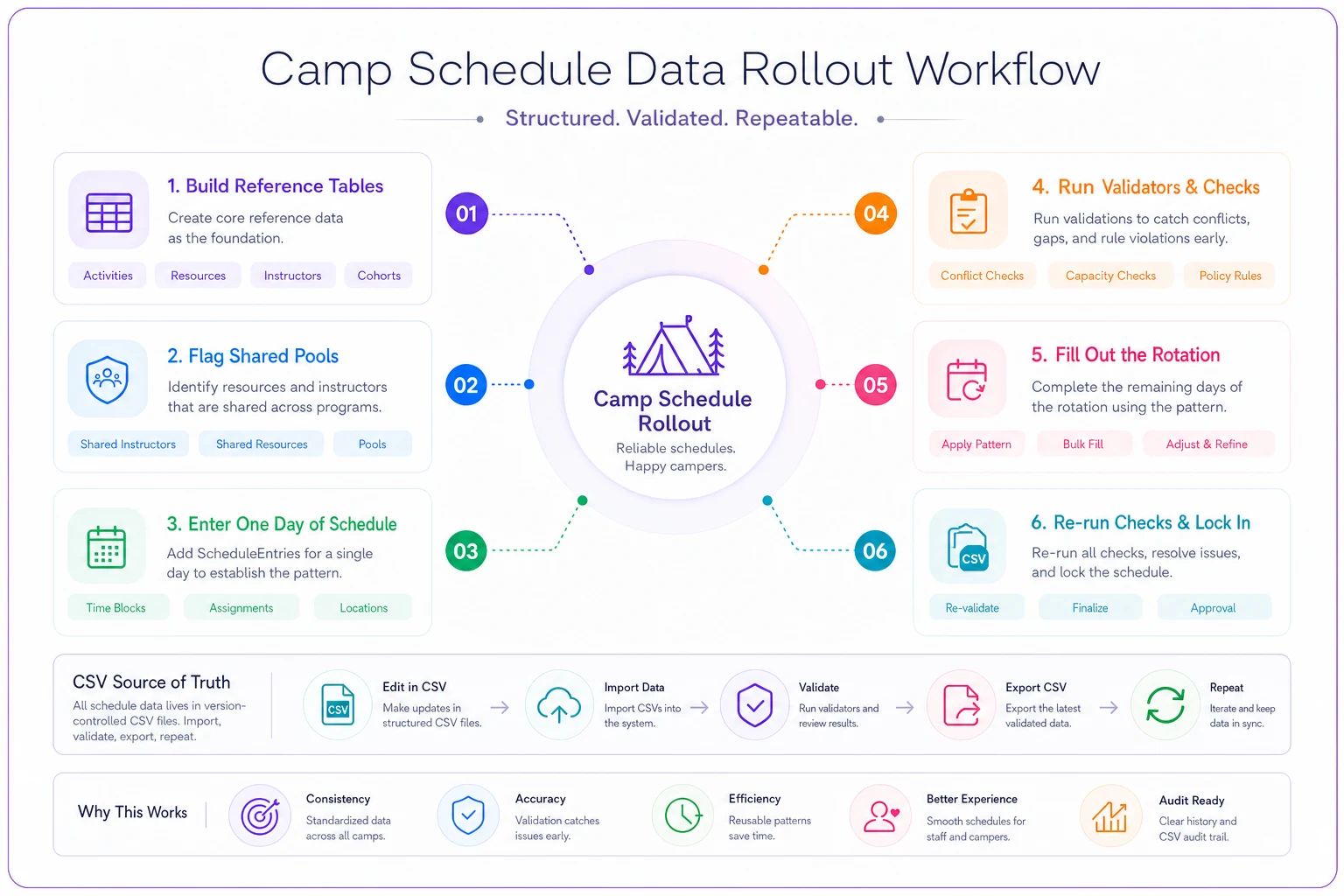
A simple diagram like this makes the step sequence clear for anyone helping with the data entry.
A conflict-free rotation isn't about planning harder — it's about structuring the schedule so the obvious mistakes can't survive to opening morning. The schemas above give you that structure, and the checks turn "I hope this works" into "I ran it, and it's clean." If you want to pair this data layer with the sequencing and fairness logic of good rotations, the 3–7 day rotation blueprint is the companion piece worth reading next.
Ready to elevate your camp management?
Join 500+ camps using Campyly to save administrative time, enhance camper experiences, and streamline daily operations.