


Every camp director I know can rattle off their headcount from memory. Ask them where that number lives, though, and the answer gets fuzzy fast. Is it the registration platform? The payment processor's paid-in-full report? The printed roster the group leaders carry? The spreadsheet someone rebuilt Sunday night because none of those three agreed?
That gap — between "the number I trust" and "the number the system shows" — is the daily reconciliation tax most camps pay without ever naming it. It's why your front desk spends the first hour of every session cross-checking who actually paid, why a kid shows up for a session nobody has record of, and why the incident report from Tuesday references a camper whose emergency contact was updated Wednesday in a system that never talked to the log.
This is a camp data architecture problem, and it's worth treating like one. Not because architecture is exciting, but because the alternative is paying two staff members to reconcile records manually for the rest of your operating life.
Why your registration system stops being the source of truth
Most camps start with registration as the center of gravity. A family signs up, the record gets created, and for a few weeks that record is genuinely accurate. Then reality starts editing it.
A parent calls to switch their kid from Week 3 to Week 5. That change goes into a note, or an email, or the director's head — not the registration record. Payment comes in through a separate processor, so "registered" and "paid" become two different truths held in two different systems. A camper's allergy shows up on a medical form that lives in a PDF folder, not on the roster the counselor actually reads.
The pattern underneath all of it: registration systems are built to capture a moment, not to maintain a state. They're excellent at the initial signup. They're terrible at reflecting the twelve small changes that happen between signup and the first day of camp. So the record drifts, and everyone quietly builds side-systems to compensate — the spreadsheet, the group chat, the printed binder — and now you have four sources of truth, none of which fully agrees with the others.
The single source of truth (SSoT) idea sounds abstract until you feel its absence. What it really means for a camp: for every important field, there is exactly one place that owns the correct answer, and every other system reads from it instead of storing its own copy.
The four systems that never quite line up
Almost every reconciliation headache traces back to four domains that were bought or built separately and were never designed to share a spine:
Simplify camp operations with centralized control.
Campyly empowers you to manage registrations, staff, and activities seamlessly—all from one platform.
- Integrated camper and staff management
- Automated notifications and alerts
- Dynamic scheduling and resource allocation
No credit card required
-
Registration — who signed up, for what session, with what add-ons
-
Payments — who owes what, who paid, refunds, credits, prorates
-
Rosters — who is physically in which group, cabin, or bus on a given day
-
Incidents — what happened, to whom, with what follow-up
Each one holds a different slice of the same camper. The problem is they each hold their own version of that camper's identity. Registration knows a kid as "Jordan M., record #4821." Payments knows them by the email on the parent's card. The roster knows them by a nickname the counselor wrote down. The incident log knows them as "the boy in the blue cabin."
When those identities don't reconcile automatically, humans reconcile them by hand — and humans reconcile them wrong under pressure. Which is exactly when it matters, like when a nurse is trying to match an injured kid to the right medical record and the roster spells the name differently than the registration.
The fix isn't a better spreadsheet. It's deciding, deliberately, which system owns which fact.
A prioritized data model for camps
You don't need to model everything. You need to model the fields that cause reconciliation work when they disagree. In practice that's a short list, and prioritizing it matters more than completeness — a rough model that ships before the season is worth more than a perfect one you never finish.
Think in three tiers.
Tier 1 — Identity and safety. These fields, when wrong, create real risk or real chaos. Camper identity, date of birth, guardian contacts, medical and allergy flags, emergency authorizations, pickup permissions. These must have one owner and must propagate instantly to everywhere they're read.
Tier 2 — Operational placement. Session enrollment, group and cabin assignment, bus route, attendance status. These change often and drive daily logistics. They don't have to be real-time to the second, but they can't be a day stale either.
Tier 3 — Financial and lifecycle. Balance owed, payment status, credits, discounts, cancellation state. These matter enormously for your revenue but rarely need to be visible to a counselor in the field. They just need to be consistent between your registration and payment layers so nobody's chasing ghost balances.
Get Tier 1 clean and owned first.
The mistake camps make is treating all three tiers with equal urgency, then burning out before finishing any of them. Get Tier 1 clean and owned first. A camp that trusts its safety data and still argues about balances is in far better shape than the reverse.
Mapping the source of truth: who owns each field
This is the heart of it. For each key field, one system is the owner — the only place that field is edited — and the others are subscribers that read it and never overwrite it. The moment two systems both claim to own a field, you've reintroduced drift.
| Field | Owner (edits here) | Subscribers (read only) | Update frequency |
|---|---|---|---|
| Camper identity / DOB | Registration | Rosters, Incidents, Payments | On change |
| Guardian & emergency contacts | Registration | Rosters, Incidents | On change |
| Medical / allergy flags | Medical intake | Rosters, Incidents, Nurse view | On change, real-time |
| Pickup authorization | Registration | Front desk, Bus rosters | Daily / on change |
| Session enrollment | Registration | Payments, Rosters | On change |
| Payment status / balance | Payment system | Registration, Front desk | Real-time or hourly |
| Credits / prorates | Payment system | Registration | On change |
| Group / cabin assignment | Roster system | Incidents, Bus routing | Daily |
| Attendance | Roster / check-in | Payments (for prorates), Reporting | Real-time |
| Incident records | Incident log | Reporting, Director review | On creation |
Two things worth calling out. First, payment status is owned by the payment system, not registration — even though registration created the enrollment. This trips up a lot of camps because their registration platform shows a balance, so they assume it's authoritative. It isn't. The card processor knows the truth; registration is guessing until it syncs.
Second, medical flags have their own owner separate from registration. Medical data changes on a different clock and often falls under different consent and retention rules. If you haven't sorted out how that data is stored, accessed, and deleted, that's a governance conversation before it's an architecture one. Sort out your data governance, retention, and consent rules before you wire anything to sync automatically — syncing sensitive fields you haven't governed just spreads the exposure.
What actually breaks as you scale
At 80 campers across two weeks, manual reconciliation is annoying but survivable. One coordinator can hold the whole picture in their head and patch the gaps.
-
The reconciliation window collapses. With rolling weekly enrollment, you never get a quiet period to sync everything up. Changes arrive continuously, so the manual "Sunday spreadsheet rebuild" has to happen daily, then twice daily.
-
Placement errors go operational. A stale roster with 80 kids means one confused counselor. A stale roster with 400 means kids on the wrong bus, in the wrong group, and a parent who can't find their child at pickup.
-
Financial leakage becomes invisible. At small scale you notice an unpaid balance. At large scale, unmatched prorate credits and unbilled add-ons slip through in the noise — a few hundred dollars a week that nobody catches until the season's over.
-
Incident follow-up loses its thread. When the incident log references a camper whose group changed twice since the report was filed, tracing accountability becomes detective work. The kind of gap that turns a documented process into an unauditable mess.
Manual reconciliation doesn't scale linearly — it scales worse than the camper count. Every added system, session, and staff member multiplies the number of places a fact can disagree with itself.
Consolidating vendors: a migration checklist that won't blow up your season
The instinct once you feel this pain is to buy one platform that does everything and rip out the rest. Sometimes that's right. But vendor consolidation is where camps lose a season of data if they rush it. The migration itself is the highest-risk moment your data ever faces.
-
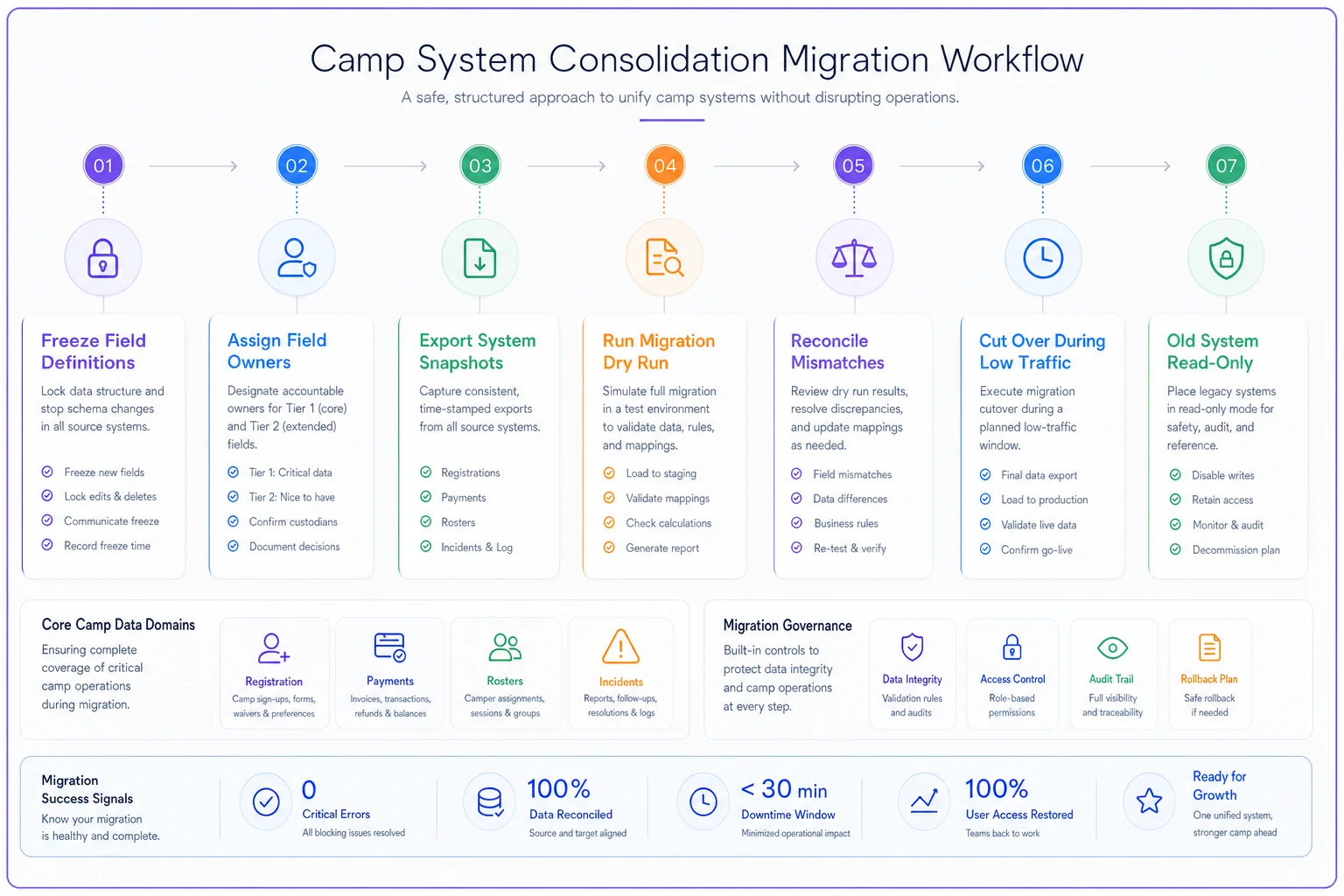
Freeze your field definitions first. Before you move anything, write down what each field means in the old systems. "Balance" in your registration tool may include deposits; "balance" in your processor may not. Migrating without reconciling definitions just moves the confusion.
-
Pick the owner for every Tier 1 and Tier 2 field using the ownership map before, not after, migration.
-
Export and snapshot everything, read-only, before touching the new system. You want an untouched copy of every record as it existed on migration day.
-
Migrate in a dry run first. Load a full copy into the new platform, then compare counts and totals against the snapshot. Camper counts, total balances outstanding, active enrollments — the numbers must match to the dollar and the head.
-
Reconcile the mismatches by hand, once. There will always be some. Records with duplicate campers, siblings under one email, canceled sessions still showing active. This is your one intentional cleanup — do it during the dry run, not live.
-
Cut over during a low-traffic window, ideally between sessions, never mid-week.
-
Keep the old system read-only for a full season. Do not delete. When a discrepancy surfaces in July, you'll want the original.
The camps that skip the dry run are the ones that discover in week two that 30 campers migrated without their medical flags. The dry run is not optional.
Here's a simple migration workflow visualization.
A real scenario
A regional day camp running roughly 350–400 kids per week across the summer was using three disconnected tools: an online registration platform, a separate card processor, and a homegrown roster spreadsheet the office rebuilt every morning. Two office staff spent close to the first two hours of every day reconciling who'd paid, who'd switched sessions, and who actually belonged on which bus.
They weren't losing enormous money, but they were losing steadily — unmatched prorate credits and missed add-on charges added up to somewhere around $4k–$6k over the season, and the daily reconciliation was eating roughly 15–20 staff hours a week between two people.
They didn't buy a magic platform. They did the boring work: defined each field's owner, made the processor authoritative for payment status, made registration authoritative for enrollment and contacts, and set the roster to pull from both instead of being retyped every morning. The morning rebuild dropped from two hours to a fifteen-minute spot-check. The financial leakage mostly closed because balances stopped being a guess. Nothing dramatic happened — the drama just stopped.
Where automation actually earns its keep
Once ownership is clear, the sync between systems is the part worth automating — and honestly, it's the only part. Automation applied before you've defined ownership just spreads bad data faster. Applied after, it removes manual reconciliation entirely, because there's nothing left to reconcile by hand.
The practical version of this is workflow and business-management software that reads from each owning system and keeps the subscribers current automatically — payment status flowing into the front-desk view, enrollment changes propagating to rosters, medical flags following a camper into whatever group they land in. AI-assisted operational platforms are genuinely useful for the messy matching underneath this: reconciling "Jordan M." with "Jordy" with the email on the card, flagging records that don't cleanly match so a human reviews the exceptions instead of eyeballing all 400.
But the software is downstream of the decisions. A tool enforcing a clean data model saves hours a day. The same tool enforcing a confused one just automates your confusion.
When this is worth it — and when it isn't
Do this if you're running multiple sessions with rolling enrollment, using two or more disconnected systems, and spending real staff time reconciling records daily. The payback is immediate and obvious.
Skip the heavy version if you run a single small camp — one session, under maybe 100 kids — where one person genuinely can hold the whole picture. Formal architecture there is overhead you don't need. Just keep one clean list and don't fragment it.
Do not start with vendor consolidation if your field definitions are still a mess. Consolidating first and defining ownership later means you migrate confusion into a shinier box. Definitions and ownership come first, always. Software second.
The reason to get this right isn't tidiness. A camp built on data it can trust makes faster, calmer decisions all season. And once you trust your numbers, you can actually start measuring the things that matter — which is a whole discipline worth building out with a prioritized KPI framework.
Your registration system isn't lying on purpose. It's just answering a question it was never designed to answer — "what's true right now?" — with information that was only true the day someone typed it. Fix the ownership, and it stops lying. Everything downstream gets quieter after that.
Ready to elevate your camp management?
Join 500+ camps using Campyly to save administrative time, enhance camper experiences, and streamline daily operations.