


Most camps handle somewhere between 400 and 600 camper records each summer, plus another couple hundred staff files, vendor contracts, and operational documents. Each category carries different retention requirements, access restrictions, and deletion obligations — and almost nobody tracks these properly until a parent requests their data or an insurance audit flags missing documentation.
The real mess starts when camps treat all data the same way. Medical forms get stored next to marketing photos. Emergency contacts sit in the same spreadsheet as dietary preferences. Parent consent forms from 2019 float around in Google Drive folders that counselors can still access. Then someone realizes they've been keeping allergy information for kids who aged out three years ago, or worse, they deleted incident reports they needed for an ongoing insurance claim.
Why camp data governance breaks down predictably
Running a camp means juggling registration systems, health management platforms, communication apps, payment processors, and activity scheduling tools. Each system holds different pieces of camper and family information. Registration pulls in everything from birthday parties attended to swimming skill levels. The nurse station tracks medications, allergies, and daily health checks. The business office processes payments, refunds, and financial aid. Activity coordinators maintain skill assessments, achievement records, and behavior notes.
Nobody designs this fragmentation on purpose. It builds up as camps add solutions to specific problems. You need better health tracking after a medication error, so you buy a medical management system. Parents want real-time updates, so you add a communication platform. The board wants better financial reporting, so you implement new accounting software. Before long you're running seven different systems that each hold overlapping pieces of camper data with zero coordination on retention or access rules.
The compliance requirements layer on top of this. COPPA governs data for campers under 13. State regulations dictate medical record retention. Insurance policies require incident documentation for specific timeframes. Background check rules control staff file management. Marketing consent affects photo usage. Financial regulations impact payment record storage.
Scale makes everything worse. A 50-camper program might track everything in spreadsheets with one person controlling access. But at 400 campers across multiple sessions, you've got program directors, unit leaders, specialists, nurses, office staff, and seasonal counselors all needing different levels of access. The counselor needs to know about allergies but shouldn't see financial aid status. The photographer needs photo permissions but not medical histories. The alumni coordinator wants historical participation data but not current health records.
Data mapping: what you actually collect and where it lives
Before building any governance framework, you need to understand your actual data landscape. Not the clean version you imagine — the messy reality of how information flows through your operation.
Simplify camp operations with centralized control.
Campyly empowers you to manage registrations, staff, and activities seamlessly—all from one platform.
- Integrated camper and staff management
- Automated notifications and alerts
- Dynamic scheduling and resource allocation
No credit card required
Start with registration data. Most camps collect:
-
Basic demographics (name, DOB, address, grade)
-
Parent/guardian contacts and custody arrangements
-
Emergency contacts and authorized pickups
-
Medical history and current medications
-
Allergies, dietary restrictions, and health conditions
-
Swimming ability and activity preferences
-
Previous camp experience and cabin requests
-
Transportation needs and pickup authorizations
-
Photo permissions and marketing consent
-
Payment information and financial aid applications
This data typically spreads across multiple systems.
The registration platform holds the initial collection. The nurse's station maintains updated medical information. The business office tracks payments in accounting software. Program staff update skill levels in activity databases. Photos end up scattered across staff phones, camp cameras, and cloud storage.
Staff data creates another layer:
-
Employment applications and resumes
-
Background check results and certifications
-
Training records and performance evaluations
-
Payroll information and tax documents
-
Emergency contacts and medical information
-
Housing assignments and dietary needs
-
Disciplinary actions and incident involvement
Vendor and operational data adds more complexity:
-
Supplier contracts and insurance certificates
-
Facility inspection reports and permits
-
Equipment maintenance logs
-
Transportation records and driver logs
-
Food service documentation
-
Program evaluation data
Vendor and operational records often live with facilities or program staff and may not be integrated into registration or HR systems, making consistent retention and access controls difficult.
Retention rules that actually work operationally
Generic retention schedules fail because they ignore how camps actually use data. You can't just say "delete after 3 years" when that same data serves multiple purposes with different retention requirements.
A practical retention framework organized by actual usage:
Active camper records (current season):
-
Full access for operational needs
-
Real-time updates permitted
-
All staff access levels active
-
No deletion during season
Immediate post-season (3 months after last day):
-
Medical records archived to secure storage
-
Behavioral notes reviewed and summarized
-
Financial records moved to accounting systems
-
Photos sorted for marketing vs. private use
-
Incident reports finalized and categorized
Recent alumni (1-3 years):
-
Registration data for returning camper reference
-
Medical trends for siblings/returning families
-
Achievement records for progression tracking
-
Reduced access — office staff only
-
No counselor-level access
Historical records (3-7 years):
-
Financial records for tax requirements
-
Incident reports for liability protection
-
Limited demographics for alumni outreach
-
Anonymized program data for planning
-
Locked access with director approval
Permanent retention:
-
Serious incident reports
-
Legal action documentation
-
Abuse allegation records
-
Major medical events
-
Fatality documentation
The challenge is executing these rules across scattered systems. Your registration platform might auto-delete after two years while your accounting software keeps everything forever. The nurse maintains paper files in locked cabinets while counselors have three-year-old rosters saved on personal devices.
Consent categories beyond the permission slip
Camps often treat consent as binary — either parents sign the form or they don't. Modern data governance requires something more granular than that.
Medical information sharing:
-
Internal staff health alerts (allergies, medications)
-
External provider communication (hospital, EMS)
-
Specialist consultation (mental health, dietary)
-
Insurance claim documentation
-
Aggregate health reporting
Communication permissions:
-
Emergency contact methods and priority
-
Routine update preferences (daily, weekly)
-
Marketing communications post-season
-
Alumni outreach and fundraising
-
Camper reunion invitations
Image and media usage:
-
Internal documentation only
-
Parent sharing within session
-
Website and social media posting
-
Marketing materials and brochures
-
Press release and media coverage
-
Commercial licensing (rare but important)
Data sharing authorizations:
-
School district program reporting
-
Grant compliance documentation
-
Research participation (anonymized)
-
Partner program referrals
-
Sibling/family account linking
Each category needs separate tracking, clear parent communication, and easy opt-out mechanisms. A parent might approve medical sharing for emergencies but restrict marketing use of photos. Another might want all the photos but no alumni communications.
The operational challenge multiplies when you realize counselors need to know photo permissions during activities, the nurse needs medical sharing rules during emergencies, and the marketing coordinator needs usage rights months after camp ends. A single permission form doesn't cover any of that properly.
Security controls that counselors will actually follow
Perfect security protocols mean nothing if seasonal staff ignore them. You need controls that balance protection with operational reality.
Access tiers that match actual roles:
Counselor level:
-
Current cabin rosters only
-
Medical alerts and dietary needs
-
Emergency contacts for assigned campers
-
No financial information
-
No historical data
-
Access expires at season end
Unit/Program leaders:
-
Full unit rosters and waitlists
-
Medical summaries for planning
-
Behavior notes and accommodation needs
-
Basic demographic data
-
No payment information
-
Access reduces post-season
Health staff:
-
Complete medical histories
-
Medication administration records
-
Treatment documentation
-
Insurance information
-
Emergency contact details
-
Extended retention for continuity
Administrative staff:
-
Full registration databases
-
Payment and financial aid records
-
Parent communication history
-
All consent documentation
-
Historical camper records
-
Year-round access maintained
Directors:
-
Complete data access
-
Audit trail visibility
-
Retention override authority
-
Deletion approval rights
-
External sharing authorization
The hard part is implementing these tiers across multiple systems. Your registration software might have role-based permissions, but the shared Google Drive with activity schedules doesn't. The group text with counselors bypasses all controls. The printed cabin roster on the clipboard has no access restrictions whatsoever.
Building your incident response checklist
When a parent demands their child's complete data file or reports a potential breach, most camps scramble to figure out what they even have. Having a plan ready before something happens is the difference between a controlled response and a chaotic one.
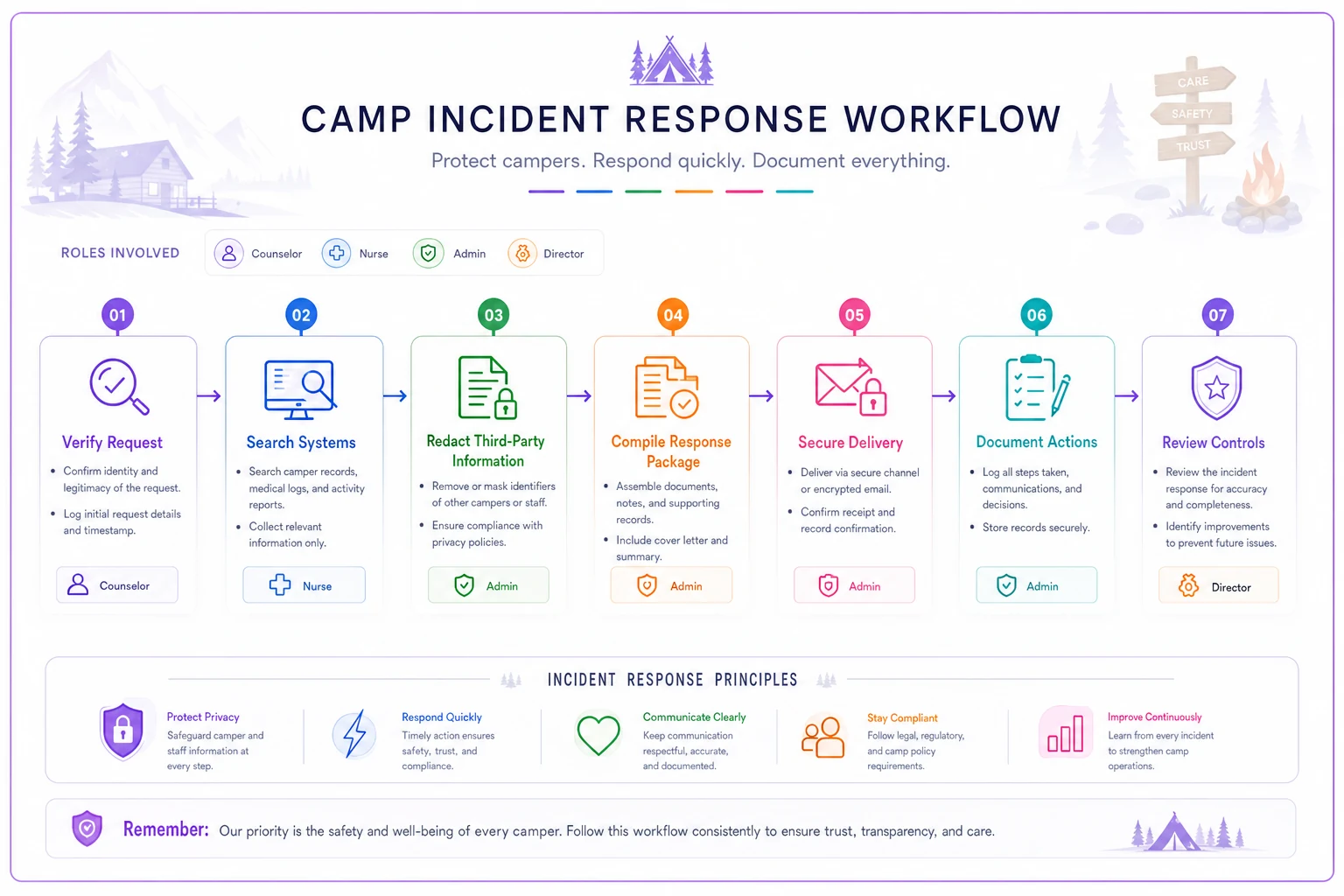
Data request response (48-hour target):
-
1. Identify the requestor and verify authority
-
2. Determine scope (specific child, all family data, timeframe)
-
3. Search all systems for relevant records
-
4. Review for third-party information requiring redaction
-
5. Compile into organized response package
-
6. Document what cannot be provided and why
-
7. Deliver through secure channel with confirmation
-
Registration platform
-
Medical files
-
Payment systems
-
Photo libraries
-
Communication logs
-
Incident reports
Potential breach response (24-hour target):
-
1. Isolate affected systems immediately
-
2. Document exactly what was exposed
-
3. Assess notification requirements
-
4. Prepare parent communications
-
5. Implement additional controls
-
6. Document all response actions
-
7. Review and adjust security protocols
-
Number of records
-
Types of information
-
Potential access period
-
Affected individuals
Inappropriate access discovery:
-
1. Suspend the individual's access immediately
-
2. Audit their recent system activity
-
3. Determine scope of inappropriate access
-
4. Assess if notification is required
-
5. Document for personnel action
-
6. Review access controls for gaps
-
7. Implement additional monitoring
A quick visual of the incident response flow helps teams understand roles and timelines.
Having these checklists ready prevents emotional decision-making under pressure. The camp that discovers a counselor screenshotted medical forms needs a clear process, not a panicked director meeting.
Sample governance policies for your board packet
Directors need board-ready language that sounds professional while staying operationally realistic. Template language that actually works:
Data Retention Policy:
"[Camp name] maintains camper and family information according to operational needs and regulatory requirements. Active season data remains fully accessible to authorized staff for program delivery. Post-season, medical and safety-critical information is archived securely with restricted access. General registration data is retained for 3 years to support returning family enrollment and program planning. Financial records follow 7-year retention for tax compliance. Incident documentation involving injury, allegations, or legal action is preserved permanently. The Executive Director oversees annual retention reviews each October, with IT systems automatically enforcing deletion schedules where configured."
Consent and Privacy Framework:
"Parents/guardians provide categorical consent during registration for: emergency medical treatment, routine activity photos, communication preferences, and directory information sharing. Each category can be modified independently through the parent portal or written request. Photo consent differentiates between internal documentation, parent sharing, and marketing usage. Medical information sharing is limited to staff with direct care responsibilities and emergency responders. Financial information access is restricted to business office personnel and the Executive Director. Consent preferences are reviewed at each registration and documented in the camper's profile."
Access Control Standards:
"Staff data access aligns with assigned responsibilities and expires at role conclusion. Seasonal counselors access current cabin assignments and essential health information only. Year-round staff maintain broader access based on operational duties. All access requires unique login credentials, with shared accounts prohibited. Mobile devices accessing camp data must use screen locks and remote wipe capability. Paper documents containing personal information require locked storage when not actively used. Access violations result in immediate suspension pending investigation."
Incident Response Protocol:
"Data incidents, including suspected breaches, inappropriate access, or parent data requests, trigger immediate response protocols. The designated privacy officer (typically Assistant Director) coordinates response within 24 hours of discovery. Parent notification occurs within 72 hours when required by regulation or when the incident poses identity theft risk. All incidents are documented, reviewed with legal counsel when appropriate, and reported to insurance carriers as needed. Post-incident reviews identify system improvements and training needs."
The table below summarizes how these policies map across staff roles for quick reference:
| Policy Area | Counselors | Unit Leaders | Health Staff | Admin Staff | Directors |
|---|---|---|---|---|---|
| Data Retention | No access to archives | Current season only | Extended medical retention | Full retention management | Override authority |
| Consent Tracking | Activity-level flags | Unit summaries | Medical consents | Full consent records | All categories |
| Access Controls | Cabin roster + alerts | Unit roster + notes | Full medical history | Full registration DB | Complete access |
| Incident Response | Report only | Initial documentation | Medical documentation | Coordination support | Final authority |
These templates give directors concise, operational language to include in board packets and governance manuals.
The automation opportunity in data governance
Properly configured operational software changes compliance from a seasonal scramble into something systematic. Instead of tracking retention dates in spreadsheets nobody checks, AI-powered platforms can automatically enforce retention rules based on data categories. The medical information from summer 2021 gets archived when regulations require it. Financial records stay accessible for the full 7-year window. Marketing photos without proper consent never enter the promotional workflow.
The same incident management system that documents behavioral issues can trigger extended retention for legal protection automatically. When a parent requests their data, the system assembles it from all connected sources rather than requiring manual searches across seven different platforms. Consent preferences flow through to operational systems — the counselor's activity app shows which kids can't be photographed before anyone has to ask.
Access control becomes enforceable when the system knows roles and adjusts permissions accordingly. The seasonal counselor loses access the day after camp ends. The nurse retains medical record access for the required retention period. The marketing coordinator sees only photos with proper permissions. Automated monitoring can also flag when someone views records outside their normal scope or pulls unusual volumes of data — the kind of thing that's impossible to catch manually.
Configure your incident management system to auto-trigger retention holds on relevant records when an incident is recorded.
For consent management, automated systems track permissions at the granular level parents actually expect. When a parent updates photo consent mid-season, every staff device reflects the change immediately. The communication platform respects contact preferences without requiring manual checking. Year-end tax receipts only go to families who didn't opt out of financial communications.
The real payoff is turning compliance into a competitive advantage. Parents increasingly ask about data handling during tours. Showing them a clear governance framework with automated enforcement builds trust in a way that a binder of policies never could. When that one parent who's a lawyer sends a formal data request, you respond completely within 48 hours instead of scrambling for weeks. When insurance auditors review your documentation, it's already organized.
Making governance operational, not theoretical
Camp data governance isn't about perfect policies that sit in binders. It's about building practical systems that protect information while supporting daily operations. Start by mapping what data you actually collect and where it lives. Build retention rules around your real usage patterns, not some generic template. Create access controls that counselors will follow because they make operational sense. Prepare incident response checklists before you need them.
The camps that treat data governance as an operational system rather than a compliance checkbox find it actually makes their programs run smoother. Parents trust you more when you can clearly explain how their information is protected. Staff make fewer mistakes when systems enforce proper access. Insurance renewals go faster when documentation is properly organized.
When that audit letter arrives or a parent demands their data file, you respond confidently instead of scrambling — because governance is built into how you operate, not bolted on as an afterthought.
Ready to elevate your camp management?
Join 500+ camps using Campyly to save administrative time, enhance camper experiences, and streamline daily operations.