


Most camp software buying decisions get made backwards. A director sees a slick demo in October, the sales rep throws in a "founder's discount" if you sign before the holidays, and by January you own a platform that handles registration beautifully but chokes the moment you try to track lifeguard certifications or pull a nurse's health-form report at 6am on opening day.
The fix isn't watching more demos. It's walking into evaluation with a scored checklist, a real RFP, and a clear sense of what things should cost. This guide gives you all three, built specifically for overnight camps running swim programs — where the stakes on health forms, aquatics staffing, and certification tracking are genuinely higher than almost any other camp type.
If you haven't already mapped what data actually lives where in your current system, read the camp data architecture and migration playbook first. This buyer's guide assumes you've done that homework and are ready to translate it into actual procurement decisions.
Start with your non-negotiables, not the feature list
Camps that regret their purchase almost always evaluated on total feature count. Camps that are happy two seasons later evaluated on a small number of things they could not operate without.
For an overnight camp with swim, that short list usually looks like:
-
Health forms that can be marked incomplete, chased automatically, and pulled into a printable camper packet the nurse actually uses
-
Certification tracking that flags expiring lifeguard, WSI, CPR, and first-aid credentials before a session starts
-
Rosters that survive mid-session cabin swaps and reflect in every downstream report
-
Aquatics scheduling that respects ratios and won't let you publish a swim block with no certified guard assigned
Everything else — parent messaging, store balances, photo sharing — matters, but those are the four things that cause real operational failures when they're weak. Score them heaviest.
The prioritized feature checklist
Break your requirements into three tiers before you talk to any vendor. This prevents the classic mistake of getting pulled in by a Tier 3 feature while a Tier 1 gap sits unnoticed.
Simplify camp operations with centralized control.
Campyly empowers you to manage registrations, staff, and activities seamlessly—all from one platform.
- Integrated camper and staff management
- Automated notifications and alerts
- Dynamic scheduling and resource allocation
No credit card required
Tier 1 — Must have (deal-breakers)
-
[ ] Roster management with real-time cabin/group reassignment reflected everywhere
-
[ ] Health form intake with configurable required fields and completeness status
-
[ ] Automated reminders for incomplete health forms (email + SMS)
-
[ ] Immunization/medication fields the camp nurse can filter and export
-
[ ] Certification tracking per staff member with expiration dates and pre-season alerts
-
[ ] Lifeguard/aquatics scheduling with ratio rules and coverage warnings
-
[ ] Role-based access (nurse sees medical, aquatics director sees certs, front desk doesn't see either)
-
[ ] Audit trail on who changed what and when
Tier 2 — Strongly want
-
[ ] Waitlist and session capacity management
-
[ ] Payment plans, deposits, and refund/credit handling
-
[ ] Parent portal with document upload
-
[ ] Swim-level assessment tracking per camper (non-swimmer/beginner/etc.)
-
[ ] Staff availability collection and shift swaps
-
[ ] Reporting builder or exportable data (not just canned reports)
Tier 3 — Nice to have
-
[ ] Photo galleries / parent engagement feed
-
[ ] Camp store / point-of-sale
-
[ ] Bunk assignment visual tools
-
[ ] Alumni / donor CRM features
A useful gut-check: if a vendor is strong on Tier 3 and vague on Tier 1, that's not a product built for an overnight swim camp. That's a product for day camps that added swim as an afterthought.
The scored evaluation matrix
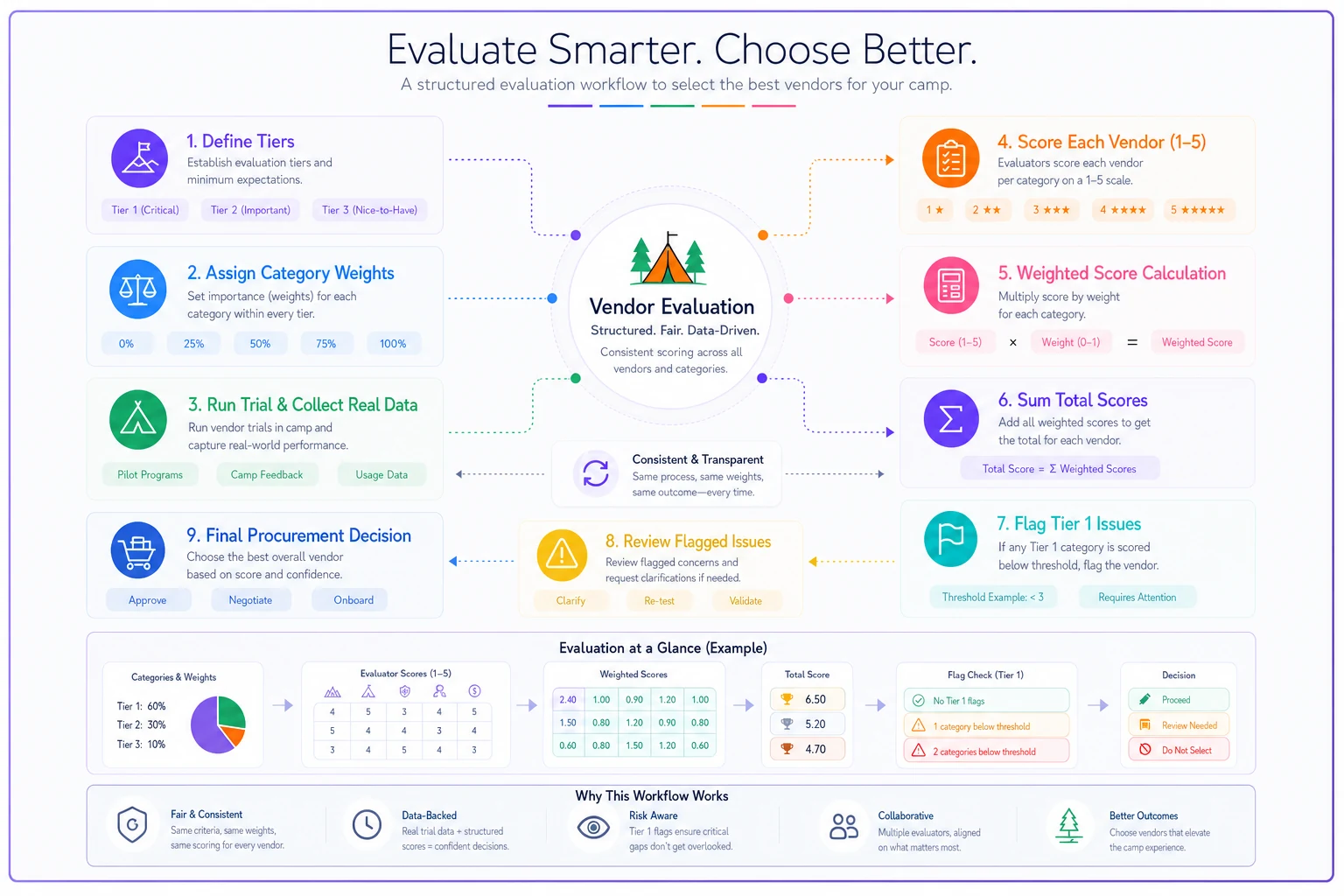
Give every finalist the same scorecard. Weight the categories so Tier 1 capabilities dominate. Score each 1–5, multiply by the weight, and total it. This turns "I liked their demo" into something you can actually defend when your board asks why you chose vendor B.
A quick visual of the scoring workflow:
| Category | Weight | Vendor A (1–5) | Vendor B (1–5) | Notes |
|---|---|---|---|---|
| Health form workflow & nurse tooling | 20% | Can the nurse actually work from it opening morning? | ||
| Certification tracking & expiration alerts | 15% | Lead time on alerts matters | ||
| Aquatics/lifeguard scheduling & ratio rules | 15% | Does it block unsafe schedules? | ||
| Roster accuracy through mid-session changes | 12% | Test a live cabin swap | ||
| Data export & reporting flexibility | 10% | Avoid data lock-in | ||
| Integrations (payments, background checks, etc.) | 8% | See integration section below | ||
| Role-based permissions & audit trail | 8% | |||
| Implementation & migration support | 7% | |||
| Pricing & contract flexibility | 5% | |||
| Support responsiveness & SLA | 5% |
Two scoring rules worth holding to:
-
Any Tier 1 category scored below 3 is a hard flag, regardless of total. A 4.6 overall score means nothing if health forms scored a 2.
-
Score from a hands-on trial, not the demo. Sales engineers configure demo environments to hide rough edges. More on trials below.
Score from a hands-on trial, not the demo. Sales engineers configure demo environments to hide rough edges. More on trials below.
A sample RFP you can adapt
Keep your RFP short enough that vendors actually answer it fully. A 40-page RFP gets skimmed; a focused 3–4 page one gets real responses. Here's a workable skeleton.
Section 1 — Camp profile
-
Number of campers per session, sessions per season, total annual campers
-
Overnight, residential, with aquatics program
-
Number of seasonal staff, number of certified aquatics staff
-
Current systems in use and what you're replacing
Section 2 — Functional requirements
List your Tier 1 and Tier 2 items and ask for one of three answers per item: Fully supported out of the box / Supported with configuration / Not supported or requires custom work. Force the specificity. "Yes" is not an acceptable answer to "does your system alert on expiring lifeguard certs."
Section 3 — Data, migration, and exit
-
How is our data migrated from the current system, and who does the work?
-
What formats can we export all our data in, at any time?
-
If we leave, how do we get a complete copy, and is there a fee?
Section 4 — Security and compliance
-
Where is camper health data stored and how is it encrypted?
-
Describe your access controls and audit logging.
-
Provide your data retention and deletion policy.
Section 5 — Pricing
-
Full pricing breakdown including per-camper fees, payment processing rates, add-on modules, and implementation/onboarding costs.
-
Contract length and renewal price protection.
Section 6 — Implementation and support
-
Typical onboarding timeline for a camp our size
-
Support channels and response-time commitments during peak season
Keep your RFP short enough that vendors actually answer it fully. A 40-page RFP gets skimmed; a focused 3–4 page one gets real responses. Here's a workable skeleton.
Interview questions that actually reveal problems
Demos are performances. The interview is where you find the cracks. Ask these to the implementation team, not just sales:
-
"Walk me through what our camp nurse sees on opening morning when 30 health forms are still incomplete." (You're testing the real workflow, not the marketing slide.)
-
"A lifeguard's CPR cert expired last night. What happens in your system when I try to schedule them today?"
-
"We move a camper from Cabin 4 to Cabin 7 on day two. Show me everywhere that has to update — and confirm it does automatically."
-
"What's the single most common thing camps our size complain about after go-live?" (A rep who says "nothing" is either new or dodging.)
-
"Who from your team is on a call with us during our first opening day, and is that included or extra?"
-
"Give me two overnight swim camps roughly our size as references I can call."
That last one filters hard. Vendors whose real client base is day camps often can't produce comparable overnight-with-aquatics references, and that tells you a lot about where their product actually fits.
What to budget: realistic pricing tiers
Camp software pricing is genuinely hard to compare because vendors bundle differently — some charge per camper, some flat annual, some make their margin on payment processing. These are ballpark ranges to plan around, not vendor-specific quotes.
| Camp size (annual campers) | Typical software cost range | What's usually included |
|---|---|---|
| Small (under ~500) | roughly $2k–$5k/year | core registration, basic forms, limited support |
| Mid (~500–1,500) | roughly $5k–$12k/year | full forms, cert tracking, scheduling, better support |
| Large (~1,500+) | roughly $12k–$30k+/year | advanced reporting, integrations, dedicated onboarding |
-
Payment processing often runs 2.9%–3.5% plus per-transaction fees. On a camp collecting several hundred thousand in tuition, that's frequently a bigger line item than the software itself. Negotiate it.
-
Implementation/onboarding can be a one-time $1k–$5k depending on migration complexity.
-
Add-on modules (aquatics scheduling, advanced reporting) are sometimes priced separately. Get the all-in number before you sign anything.
Budget total cost of ownership, not the headline subscription. A cheaper platform charging 3.4% on processing can end up costing more than a pricier one at 2.9%.
Trial length and acceptance criteria
Never buy on a demo alone. Insist on a real trial with your own data, and define what "pass" means before it starts.
Recommended trial length: 3–4 weeks minimum. Anything shorter and you can't test a full workflow cycle. Push for a trial that includes a sample migration of last season's data, not a blank sandbox — you learn far more running against real rosters and real health-form messiness.
Acceptance criteria to write down in advance:
-
Import a sample of last season's rosters and health forms; verify nothing critical drops or mis-maps.
-
Configure and publish one week of aquatics coverage; confirm the system blocks an unstaffed swim block.
-
Enter a staff member with a cert expiring in 10 days; confirm the alert fires with correct lead time.
-
Run the nurse's morning report and confirm it's usable as-is.
-
Have two seasonal staff — not tech-savvy ones — complete a real task unassisted. If they can't, that software will generate support tickets all summer.
Write these as pass/fail. "It seemed fine" is exactly how camps end up with tools that technically work but nobody actually uses.
Integration categories to require during evaluation
Your camp software shouldn't be an island, and the integrations you need are fairly predictable for an overnight swim program. Require the vendor to demonstrate working connections — or clean data export — in these categories:
-
Payment processing (e.g., Stripe-based or a bundled processor) — confirm the effective rate and whether refunds/credits flow back cleanly
-
Background screening for seasonal staff — a real connection to a screening provider saves a significant manual bottleneck at hiring time
-
Email/SMS messaging for automated form reminders and parent communication
-
Accounting export (e.g., QuickBooks-compatible) so finance isn't re-keying deposits
-
Electronic signature / document collection for waivers and permission forms
If a platform can't integrate but can export clean, complete data on demand, that's an acceptable fallback. What's not acceptable is a closed system with no export path — that's how you get locked in with no good options when things go sideways.
A short real scenario
A mid-sized overnight camp — around 900 campers a season, roughly 14 aquatics staff — spent two summers on a platform that handled registration well but tracked certifications in a separate spreadsheet. One season they nearly scheduled a guard whose lifeguard cert had lapsed. A coordinator caught it manually the night before. That near-miss is what pushed them to re-evaluate.
Running a scored matrix like the one above, they realized their incumbent scored a 2 on both cert tracking and aquatics scheduling — their two highest-risk categories. They switched to a platform where expiring certs flagged 30 days out and the scheduler refused to publish an uncovered swim block. The measurable win wasn't dramatic cost savings; it was that health-form chasing dropped from a two-person, week-long scramble to mostly automated reminders, and the aquatics director stopped keeping a shadow spreadsheet. The quieter win was risk they no longer carried.
When switching is worth it — and when it isn't
It makes sense when:
-
your current system scores below 3 on any Tier 1 category, you're maintaining shadow spreadsheets to cover gaps, or you can't get your own data out cleanly.
It's probably a mistake when:
-
the pain is really a configuration problem you never fixed, or you're mid-season. Migrating rosters and health data during an active session is asking for trouble — plan switches for the off-season with a full trial behind you.
Who should probably wait:
-
camps under roughly 200 campers with simple programs and no real aquatics complexity. The overhead of migration can outweigh the gain until you grow into it.
Migrating rosters and health data during an active session is asking for trouble — plan switches for the off-season with a full trial behind you.
Bringing it together
The camps that procure well don't buy the most impressive demo — they buy the platform that scored highest on the four things that actually break an overnight swim operation: health forms, certifications, rosters, and aquatics coverage. Build the scorecard, run a real trial with real data, budget the all-in cost, and make vendors give specific answers instead of a polished slideshow.
And before you migrate anything, validate your data models and migration steps against the camp data architecture and migration playbook — because the cleanest evaluation process in the world won't save you if the data lands in the new system broken.
Ready to elevate your camp management?
Join 500+ camps using Campyly to save administrative time, enhance camper experiences, and streamline daily operations.