



The dangerous part of seasonal hiring isn't the counselor you screen carefully in February. It's the last-minute lifeguard you bring on the Thursday before session two starts, when three staff quit and you have 40 kids arriving Monday. That's the hire that slips through with an incomplete file. And that's the file a lawyer, an accreditation reviewer, or a parent's attorney will pull first if something goes wrong.
Most camps don't have a screening problem. They have a screening lifecycle problem. The checks exist somewhere — in someone's inbox or a shared drive folder — but there's no system that guarantees the right check happened for the right role, got stored properly, and that someone can prove it six months later. That gap is what this post fixes.
We're going to cover the full operational lifecycle for camp background checks on seasonal hires: which checks are actually required by role, how often you recheck returning staff, where and how you store results so they survive an audit, how you escalate a hit or a discrepancy, what to demand from your screening vendor, and an audit-trail template you can hand to your board.
Start with role-based screening tiers, not one blanket check
The most common mistake is running the same background check on everyone. It feels fair and simple, but it's both over-screening (wasting money on a 16-year-old kitchen helper who never touches a camper unsupervised) and under-screening (a bus driver who needs a motor vehicle record you never pulled).
Screening breaks cleanly into tiers based on access to children and specialized duties. Here's a practical tier structure you can adapt.
| Role tier | Typical roles | Required checks |
|---|---|---|
| Tier 1 — Direct unsupervised child access | Cabin counselors, unit leaders, lifeguards, specialists (archery, waterfront) | SSN trace, national criminal database, county criminal (7 yrs, all residences), sex offender registry (national + state), reference checks, prior camp employment verification |
| Tier 2 — Supervised or intermittent child access | Kitchen staff, maintenance, admin support, CITs 18+ | SSN trace, national criminal database, sex offender registry, at least one county criminal search |
| Tier 3 — Driving responsibilities (in addition to their tier) | Bus/van drivers, activity trip drivers | Motor vehicle record (MVR), CDL verification if applicable, drug screen where required |
| Tier 4 — Licensed/clinical | Camp nurse, medical director, mental health staff | License verification, sanctions/exclusion list check (OIG/SAM), plus Tier 1 checks |
What most directors miss: county-level criminal searches matter more than the national database. The national database is a patchwork of aggregated records with real gaps, especially for recent charges. A hire who moved states two years ago can have a clean national pull and an open county case you'd only catch by searching every county they lived in. Build your Tier 1 requirement around residence history, not just a single national hit.
One more thing on volunteers. If a parent volunteer will be alone with campers or staying overnight, they belong in Tier 1, full stop. "They're just a parent helping out" is how the worst files get created.
The recheck cadence for returning staff (the part everyone forgets)
Camps do a decent job screening new hires. Where things fall apart is returning staff. A counselor you cleared in 2023 comes back in 2024 and 2025, and nobody re-runs anything because "we already checked them." Two seasons is plenty of time for a DUI, a restraining order, or a new charge in another state.
Simplify camp operations with centralized control.
Campyly empowers you to manage registrations, staff, and activities seamlessly—all from one platform.
- Integrated camper and staff management
- Automated notifications and alerts
- Dynamic scheduling and resource allocation
No credit card required
Set a recheck cadence and automate the reminders so it doesn't depend on memory during your busiest weeks.
-
Every returning seasonal hire re-run the full tier-appropriate check annually before their first working day. No exceptions for "we've known them forever."
-
Drivers re-pull the MVR annually and mid-season if they'll be driving during a second session, because a summer speeding suspension won't show up on a March pull.
-
Multi-year staff consider enrolling Tier 1 staff in continuous criminal monitoring if your vendor offers it, so a mid-season arrest triggers an alert instead of surfacing next spring.
-
License holders (nurses, etc.) verify license status within 30 days of the start date, since a license can be suspended between seasons.
The highest-trust returning staff are the ones most likely to skate through with a stale check, precisely because everyone trusts them. Your cadence has to treat the veteran and the brand-new hire identically. Build it into the rehire workflow the same way you'd build background verification into any reproducible staffing model — as a fixed step, not a judgment call.
Storage and audit conventions that survive scrutiny
A completed background check that you can't produce cleanly is almost as bad as not running it. When an accreditation reviewer or an insurer asks for proof, they want to see it fast, consistently formatted, and with a clear record of who cleared this person and when.
One file per person, structured identically. Every staff file should contain the same fields in the same order: identity verification, each check type with completion date, the adjudication decision (clear / flagged / cleared-with-review), the name of the person who made the final hire decision, and the date they were approved to work.
Separate the raw report from the decision record. Background check reports contain sensitive personal data and, in many jurisdictions, have legal handling requirements. Keep the full report access-restricted, and keep a lightweight "clearance summary" that non-HR staff can reference without seeing SSNs or case details.
Keep a lightweight clearance summary separate from raw reports so non-HR staff and schedulers can confirm clearance without accessing sensitive data.
Retention with an end date. Don't keep raw reports forever "just in case." Decide a retention window that matches your legal and insurance requirements, tag each file with a destruction date, and actually destroy the raw data on schedule. Over-retention is its own liability.
Immutable timestamps. The single most important audit feature is a record you can't quietly backdate. "We cleared her before she started" only means something if the system shows the clearance timestamp came before the first shift timestamp. If your files live in a shared drive where anyone can edit a date, you have no real proof.
``
LastNameFirstName2026
  ├─ 01identityverification
  ├─ 02criminalchecks (RESTRICTED)
  ├─ 03drivingrecord (if applicable)
  ├─ 04clearancesummary  ← status: CLEARED, date, approver
  └─ 05consentanddisclosureforms
Destruction date: [set per retention policy]
``
This structure keeps auditors happy and keeps sensitive data from floating around in staff-accessible folders. It takes maybe an hour to set up as a template the first time, and then it's just a copy-paste for every new hire.
Exception escalation: what to do when something comes back
Most background checks come back clean. The whole system exists for the small percentage that don't — and that's exactly the moment when camps improvise and get themselves in trouble.
You need a written escalation path before the season, because in-season you won't have time to think clearly, and you absolutely cannot make an individualized-assessment decision in a panic on a Sunday night.
-
Hit received. The screening result flags a record. The hire is not cleared to work — status stays "pending review," and they don't get scheduled.
-
Verify accuracy. Confirm the record actually belongs to this person (name and DOB matches, not a common-name false positive) and that it's reportable under your jurisdiction's rules.
-
Individualized assessment. Look at the nature of the offense, how long ago it occurred, and its relevance to the role. A 12-year-old possession charge is not the same as a recent offense involving a minor. Document the reasoning.
-
Adverse action process, if declining. If you're not going to hire based on the report, follow the required pre-adverse and adverse action notice steps. This is a legal process, not an optional courtesy — skipping it is where camps get sued even when the hiring decision itself was reasonable.
-
Record the outcome. Whatever you decide, the clearance summary reflects it with a date and the decision-maker's name.
The mistake that comes up repeatedly: a director sees a flag, quietly decides not to hire the person, and never documents why or runs the adverse action process. That informal "just move on" reaction creates more legal exposure than a documented decline of someone with a serious record. Document the boring outcomes too.
What to demand from your screening vendor
Not all screening vendors are built for camps, and the cheap instant-check services usually have the biggest gaps. Use this checklist when you evaluate or renew:
-
FCRA-compliant with proper consent, disclosure, and adverse action support built in
-
County-level searches available for all residences, not just a national database pull
-
Sex offender registry across national and all relevant state registries
-
MVR and CDL verification for driving roles
-
License and sanctions verification for clinical staff
-
Continuous monitoring option for returning multi-year Tier 1 staff
-
Turnaround time in writing — you need to know if a county search takes 3 days or 3 weeks before you're up against a session start
-
Documented data handling and retention so their storage practices match yours
-
Exportable audit records with timestamps you can hand to an accreditor
-
Re-screen workflow that makes annual rechecks a bulk action, not 60 individual orders
The turnaround point deserves emphasis. A vendor that's fast on national checks but slow on county searches will quietly push you toward under-screening every time you're in a hiring crunch — which is exactly when you're most tempted to cut corners. Know their real timelines and factor them into your hiring calendar so you're not choosing between "start on time" and "properly screened."
Sample automation reminders that keep the cadence honest
The reason screening lapses isn't laziness — it's that the reminders live in one coordinator's head during the exact weeks they're drowning. The fix is a set of triggered reminders tied to dates and hiring status, so the system follows up on schedule instead of relying on anyone remembering.
-
90 days before session 1 "Rehire screening batch due — re-run checks for all returning staff before scheduling."
-
On offer acceptance "New hire [name] — order Tier [X] checks now. Status: pending. Do not schedule until CLEARED."
-
7 days before start date, if not cleared "⚠️ [Name] starts in 7 days and status is still PENDING. Escalate or hold from schedule."
-
On MVR expiration (365 days) "Driver [name] MVR expires this week — re-pull before next driving assignment."
-
Mid-season, second session drivers "Re-pull MVR for drivers returning for session 2."
-
30 days before license expiration "Nurse [name] license verification needed."
-
Retention destruction date reached "Background report for [name] due for secure destruction per retention policy."
The high-value trigger is the "not cleared and starting soon" alert. That single reminder catches the exact failure mode that creates real risk — the person who ends up on a schedule with an incomplete file because everyone assumed someone else handled it. If you build only one piece of this, build that one.
This connects directly to how you handle sudden gaps in coverage. When you're scrambling to fill a last-minute staff absence during a peak week, the temptation to skip screening on an emergency hire is enormous — and a hard "no schedule until cleared" gate in your system is what protects you when your judgment is compromised by the crisis.
Screening pipeline: how a hire moves from offer to first shift
Understanding the sequence matters as much as the individual steps. Here's how a properly gated pipeline flows from offer to first shift:
``
Offer extended
      ↓
Consent & disclosure forms signed
      ↓
Tier assigned → checks ordered
      ↓
Results received → reviewed
      ↓
Clear?
  ├─ YES → Clearance summary updated, cleared-to-work date recorded
  │         ↓
  │     Scheduling unlocked
  └─ NO  → Pending review / individualized assessment
            ↓
        Adverse action process (if declining) OR cleared-with-review
            ↓
        Outcome documented with date and approver
``
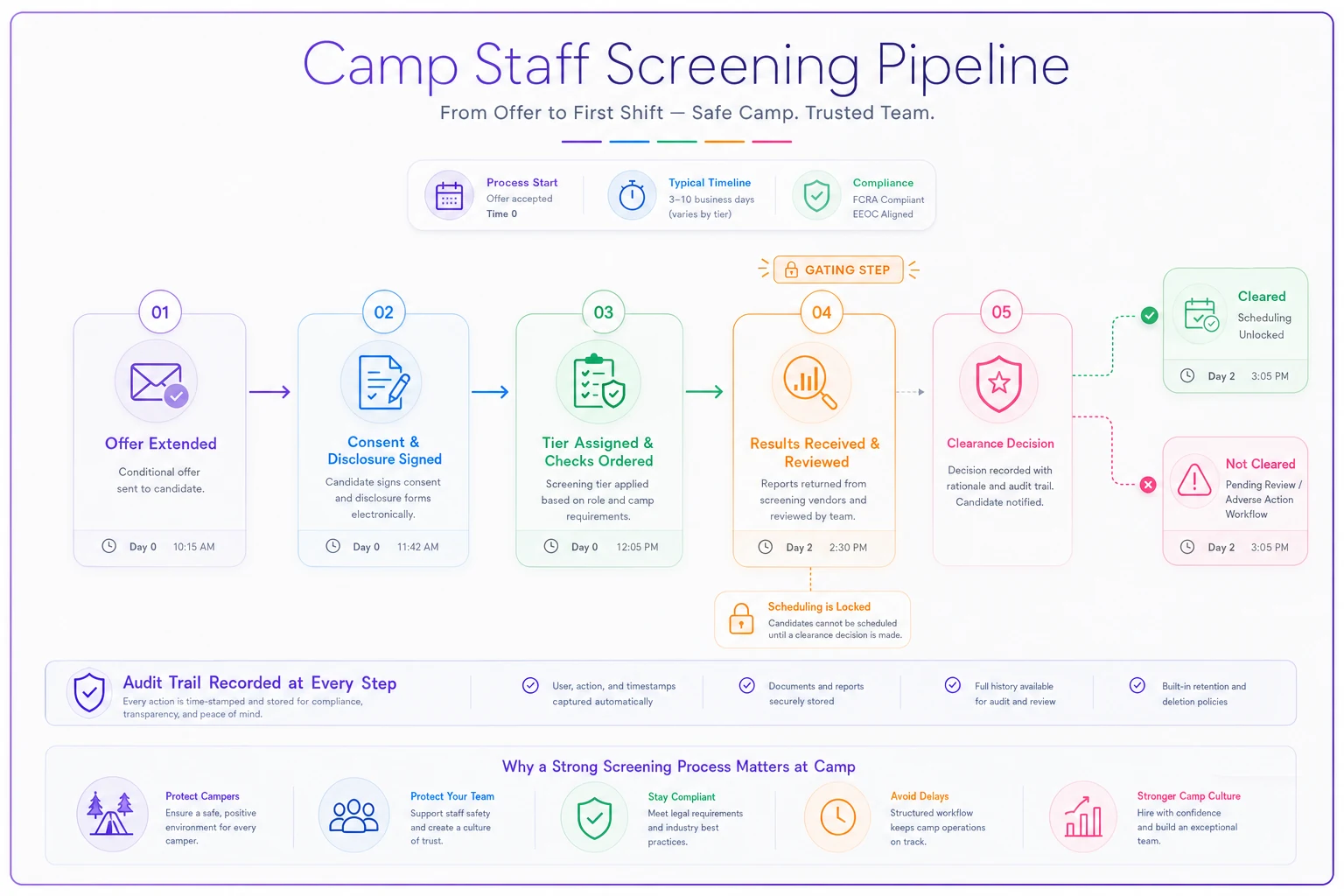
A simple visual of this gated pipeline helps teams keep the ordering and the "no schedule until cleared" gate front of mind.
An audit-trail template your directors can adopt
When your board, insurer, or accrediting body asks how you know everyone working with kids this summer was properly screened, you want to answer with a single exportable record, not a scramble through email. Here's a template that proves compliance at a glance.
| Field | What it captures |
|---|---|
| Staff name & role | Who they are and which screening tier applies |
| Screening tier | Determines which checks were required |
| Checks completed | Each required check + date completed |
| County searches | List of counties searched + residence history basis |
| Result | Clear / Flagged / Cleared-with-review |
| Adjudication notes | If flagged, the individualized-assessment reasoning |
| Cleared-to-work date | Timestamp of final clearance |
| First shift date | Proves clearance preceded work |
| Approved by | Name of the person who made the final decision |
| Recheck due date | Next required screening date |
| Retention/destruction date | When raw report gets destroyed |
The two fields that do the heavy lifting in an audit are cleared-to-work date and first shift date side by side. If the clearance date consistently precedes the first shift date across your entire roster, you've demonstrated the one thing every reviewer actually cares about: nobody worked with children before they were screened. That's your proof, in one column comparison.
When this level of rigor makes sense — and when it's overkill
If you're running a small day camp with a handful of staff who all return each year, you can run this lifecycle on a spreadsheet with calendar reminders and be perfectly fine. The tiers, the cadence, and the audit-trail fields still apply — you just don't need software to enforce them.
Where the manual approach breaks is at scale and speed. Once you're hiring 40+ seasonal staff across multiple sessions, running annual rechecks, tracking driver MVRs, and managing offer-to-clearance timing under deadline pressure, the tracking itself becomes the failure point. That's when a system that ties screening status to scheduling — so an uncleared hire physically can't be assigned to a group — stops being a convenience and starts being the thing that saves you.
Who should not over-invest here: a camp with three total staff, all multi-year returning, all screened last month. Don't build a compliance apparatus bigger than your risk. But the moment you're onboarding people you don't personally know, under time pressure, the lifecycle above is the cheapest insurance you'll buy all season.
A quick real scenario
A mid-sized overnight camp — roughly 55 seasonal staff across three sessions — had a decent screening process on paper but ran it through a coordinator's inbox and a shared drive. Their gap wasn't sloppiness; it was returning staff. About a third of their crew came back each year, and rechecks quietly didn't happen because "we already had them on file."
During a pre-season review they pulled every returning-staff file and compared clearance dates to start dates. Around 15 people had no screening newer than two years old, and two drivers had MVRs older than the last full season. Nothing catastrophic surfaced — but one returning counselor had a recent charge in a neighboring state that their original file obviously couldn't have caught.
After switching to a role-tiered lifecycle with automated recheck reminders and a hard "no clearance, no schedule" gate, the change wasn't dramatic-sounding — but it was the right kind of boring: every staff member had a current, tier-appropriate check with a clearance date on file before their first shift, and the director could export the whole roster's audit trail in a few minutes. The counselor with the new charge went through a proper documented review instead of slipping onto a cabin assignment by default.
Seasonal screening fails in predictable places: the rushed last-minute hire, the trusted returning staffer nobody rechecked, the flagged result handled informally, and the completed check nobody can find months later. Fix those four failure points — tier your checks, automate the recheck cadence, escalate hits through a written process, and store everything with clearance-before-first-shift timestamps — and you've built a pipeline that protects campers first and proves itself to auditors second.
None of this requires a huge budget. It requires deciding before the season that screening is a fixed gate every hire passes through, not a task that competes with everything else during the weeks you have no time. Build the gate, and the crisis-week temptation to wave someone through simply stops being an option.
Ready to elevate your camp management?
Join 500+ camps using Campyly to save administrative time, enhance camper experiences, and streamline daily operations.