


Most camps don't fail because of one catastrophic event. They fail because a shock hits in week two, nobody has a pre-agreed trigger for action, and the director spends four days deciding what to do while payroll keeps running. The decision lag costs more than the shock itself.
A camp cashflow stress test isn't a fancy financial model. It's a set of pre-filled spreadsheets that tell you, in advance, exactly what you'll do when enrollment drops, a chunk of families cancel, or a supplier doubles a price with two weeks' notice. The point is to make the decision before you're emotional and short on cash.
This post gives you three copy-paste scenarios, the exact trigger thresholds that activate each one, and the scripts you hand to staff, suppliers, and parents so you're not writing them at 11pm during the crisis.
Why camps get blindsided by shocks they technically saw coming
Directors track enrollment obsessively but almost never translate those numbers into cash timing. You can be at 94% of your enrollment target and still miss a payroll run if 40% of those families are on payment plans that don't clear until July.
Enrollment is a vanity number until it becomes deposited cash. The gap between "committed" and "collected" is where camps get caught off guard.
Three shocks cause the most damage, and each hits a different part of the cash picture:
-
Late enrollment — seats stay empty past your go/no-go date, so you've already committed to staff and food for campers who never show.
-
Mass cancellations — a cluster of families pulls out at once (a local outbreak scare, a competing program, an economic wobble), and your refund obligations spike exactly when deposits stop coming in.
-
Supply shocks — a food vendor, bus contractor, or activity supplier raises prices or can't deliver, right when you have zero slack to absorb it.
These feel like ambushes because most camps don't have a trigger. They have a vague sense that "numbers are soft" and keep hoping. A stress-test template replaces hoping with a threshold.
The structure of a usable stress-test template
Forget 30-tab financial models. The version camps actually use fits on three tabs per scenario:
Simplify camp operations with centralized control.
Campyly empowers you to manage registrations, staff, and activities seamlessly—all from one platform.
- Integrated camper and staff management
- Automated notifications and alerts
- Dynamic scheduling and resource allocation
No credit card required
-
Inputs — the handful of numbers that drive everything (enrollment target, break-even headcount, fixed weekly burn, deposit-to-collection timing, refund policy exposure).
-
Triggers — the specific threshold that flips you from "watching" to "acting."
-
Activation checklist + scripts — the exact steps and pre-written messages for staff, suppliers, and parents.
Below is the core input block you'll reuse across all three scenarios. Fill it once per session.
| Input | Example value | Why it matters |
|---|---|---|
| Break-even headcount (per session) | 62 campers | Below this, the session loses money regardless of effort |
| Current confirmed (deposit cleared) | 48 | The real number, not the "interested" number |
| Fixed weekly burn (staff + facility + insurance) | ~$31k | What you pay whether 48 or 82 kids show up |
| Variable cost per camper/week | ~$145 | Food, materials, supplies that scale with heads |
| Avg revenue per camper/week | ~$640 | After typical discounts |
| Deposit → full payment gap | 26 days avg | How long committed money takes to become usable cash |
| Refund exposure if cancelled now | ~$390/camper | What you owe back under current policy |
Fill the core input block once per session and reuse it across scenarios to avoid recalculation errors.
Everything downstream keys off these seven lines. Get them accurate and the triggers almost build themselves.
Scenario 1: Late enrollment (the slow leak)
This is the quietest shock and the most expensive, because it doesn't feel like a crisis — it feels like "it'll fill in." Then the session starts underwater.
How it actually plays out: You're 21 days from a session with 48 confirmed against a 62 break-even. Historically you close that gap in the final two weeks, so you do nothing. This year the late surge is smaller. You open at 54, having already locked staff and committed a food order for 68.
Decision triggers
-
Watch trigger confirmed enrollment below 80% of break-even at T-minus 21 days. (48 ÷ 62 = 77% → already tripped in the example above.)
-
Act trigger confirmed below break-even at T-minus 10 days. This is the no-go decision point.
Activation checklist
-
[ ] Freeze all non-committed variable spend (final food order, consumables top-ups)
-
[ ] Pull the staffing plan and identify which roles are flex vs. fixed — see your reproducible staffing model with contingency headcount to know which counselors you can delay confirming
-
[ ] Run the merge-or-cancel math
can this session combine with the adjacent week?
-
[ ] Trigger the late-enrollment incentive (details below) within 24 hours of the watch trigger
-
[ ] Notify food/transport suppliers of a possible headcount reduction so you're not eating a full order
The mitigation script (parent-facing, late-fill push)
> "A few spots opened for [Session Name], [dates]. We keep these sessions small, and we're close to our final headcount — if you've been on the fence, this is the week to grab a place. Register by [date] and use CAMPFILL for $[X] off."
Keep the discount modest. The mistake camps make is panic-discounting 25% in the final week, which trains families to wait every year. A $40–$60 nudge fills most fence-sitters without poisoning next season's pricing.
When cutting the session is the right call
If you're below break-even at T-10 and the adjacent session has capacity, merging usually beats running two thin weeks. One session of 74 is dramatically healthier than two of 48 and 51. Combine, move the under-filled staff, and refund or shift the handful of families who can't flex.
Scenario 2: Mass cancellations (the cliff)
Cancellations rarely arrive evenly. They cluster — one parent in a WhatsApp group cancels, posts about it, and nine more follow within 48 hours. The cash damage comes from two sides at once: refunds go out while new deposits dry up.
A realistic example with numbers: A day camp at 71 confirmed gets hit by a local scare — a stomach bug rumor, often overblown but it doesn't matter. Over four days, 14 families cancel. Refund exposure at ~$390 each is roughly $5,500 going out. Meanwhile new signups stall completely for a week. The session drops to 57 — still above a 55 break-even, but the cash dipped below payroll because refunds and burn collided at the same time.
Decision triggers
-
Watch trigger 4+ cancellations within 72 hours from the same session or cause.
-
Act trigger cancellations push confirmed below break-even OR projected cash balance drops under one payroll cycle of cushion.
Activation checklist
-
[ ] Identify the cause cluster — are cancellations random or driven by one rumor you can address?
-
[ ] Pause outbound refunds for 24 hours (not to stall families — to batch them and confirm your cash position first)
-
[ ] Activate the waitlist immediately to backfill cancelled seats
-
[ ] Review which refunds are policy-required vs. credit-eligible; your operational rules for cancellations, prorates, and automated credits determine how much cash actually has to leave
-
[ ] Send the stabilizing parent message within 12 hours of the watch trigger
The supplier script (reduce the downstream order fast)
> "Hi [Vendor] — heads up that our headcount for [dates] has shifted. Please hold our order at [reduced number] meals/units per day instead of [original]. Confirming final count by [date]. Appreciate the flexibility."
Sent early, this saves you from paying for food for campers who aren't coming. Sent late, it does nothing — vendors have already prepped.
The parent script (address the cause, don't beg)
> "We've heard a few questions about [concern]. Here's exactly what we're doing: [2–3 concrete actions]. [Session] is running as planned with full staffing. If you have questions, reply here or call [number] — happy to talk it through."
Notice what this script doesn't do: it doesn't offer a refund you weren't asked for, and it doesn't sound defensive. Over-apologizing signals there's something to worry about and accelerates the cluster.
Scenario 3: Supply shocks (the margin squeeze)
Supply shocks don't threaten whether camp runs — they threaten whether it runs profitably. A food distributor adds a 9% surcharge. The bus contractor raises per-route pricing after you've published dates. An activity supplier can't deliver kayaks for the waterfront week.
The trap is that these costs are easy to absorb one at a time, so directors wave them through. Three small surcharges in one season quietly erase your reserve.
Decision triggers
-
Watch trigger any single supplier cost increase above 6% on a budgeted line.
-
Act trigger cumulative in-season cost increases exceed 2% of total session budget, or a critical supplier can't fulfill at all.
A quick decision table for supply shocks
| Situation | Absorb | Substitute | Pass through to families |
|---|---|---|---|
| <6% increase, non-critical item | ✅ | — | — |
| 6–15% on a swappable item (snacks, craft supplies) | — | ✅ | — |
| Critical service, no substitute (transport, insurance) | Short term only | — | ✅ next season, not mid-season |
| Supplier can't deliver at all | — | ✅ emergency | — |
The rule that saves camps: never pass a mid-season cost increase to families who've already paid. It destroys trust for the sake of a few hundred dollars. Absorb it this season, fix it in next year's pricing.
Activation checklist
-
[ ] Confirm whether the increase is a one-off or a reset to a new baseline
-
[ ] Check contract terms — many surcharges violate a locked-rate clause you can push back on
-
[ ] Price two substitute suppliers before accepting the increase
-
[ ] For critical services, calculate the true pass-through impact for next season only
-
[ ] Log the shock so it's built into next year's budget and not a surprise again
The supplier negotiation script
> "We budgeted [line] at [rate] based on our agreement through [date]. The new pricing puts us over for the season. Can we hold the agreed rate through [end date] and revisit for next year? If not, we'll need to compare alternatives before renewing."
Half the time, naming the agreed rate and mentioning alternatives walks the increase back. Suppliers push surcharges to camps that don't push back.
How to run the stress test (the actual process)
You don't need to do this weekly. Run it at three fixed points per session and after any watch trigger fires.
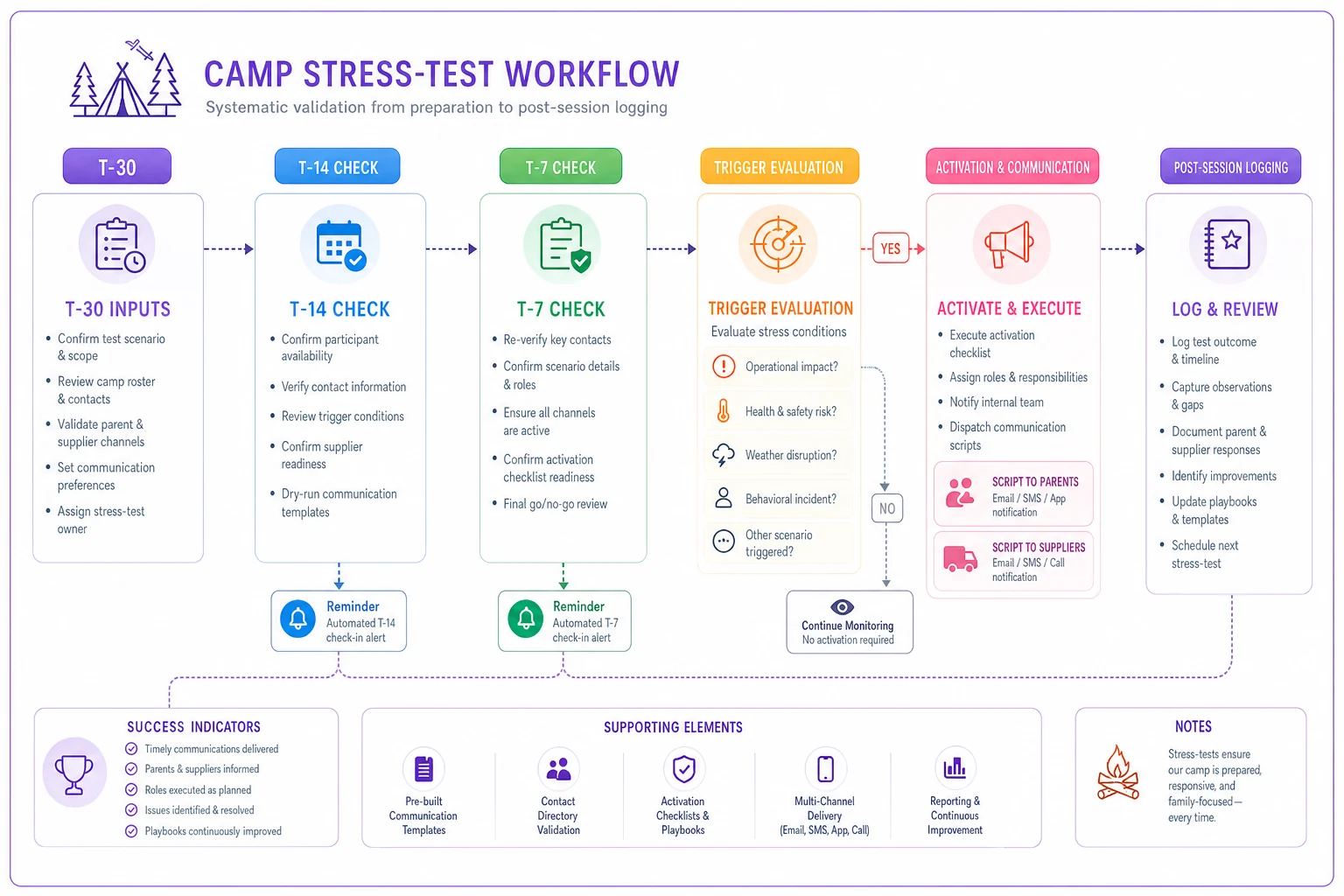
This visual shows the workflow from T-30 through activation and post-session logging.
-
At T-30 days
fill the input block with current confirmed numbers. This is your baseline.
-
At T-14 days
re-run. Compare confirmed-to-break-even and cash runway in payroll cycles.
-
At T-7 days
final check. Any trigger tripped here moves straight to the activation checklist — no deliberation.
-
On any watch trigger, any time
pull the relevant scenario tab, run the math, and start the 24-hour clock on scripts.
-
After the session
log which triggers fired, what you did, and what it cost. This is how next year's thresholds get sharper.
The discipline isn't in the spreadsheet — it's in agreeing now, while calm, that when a trigger fires you act within the stated window. The most common failure mode is a director who built the template, watched a trigger trip, and then decided to wait and see anyway.
Where software quietly helps (and where it doesn't)
A spreadsheet is enough to run every scenario above — plenty of well-run camps do exactly that. The friction isn't the math; it's keeping the inputs current. The confirmed-vs-break-even number is only useful if it reflects deposits that actually cleared today, not last Tuesday.
This is where an AI-assisted camp management platform earns its keep: it keeps the input block live. When a deposit clears, a family cancels, or a waitlist seat fills, the confirmed number and cash runway update automatically — so your watch triggers fire on real data instead of a spreadsheet someone forgot to refresh. Some platforms will also flag a cancellation cluster before you've noticed the pattern yourself.
Tie the confirmed number to deposit-clearing timestamps so triggers reflect usable cash, not pledged seats.
Don't over-engineer this, though. The template, the triggers, and the pre-written scripts matter far more than any tool. A director with three sheets and clear thresholds will outperform one with fancy dashboards and no decision rules every single time.
A short real scenario
A mid-size day camp running six weeklong sessions kept hitting the same wall: strong total enrollment, but one or two sessions a summer that quietly ran under break-even while the director waited for a late surge that came in thin.
They built the late-enrollment trigger — 80% of break-even at T-21, break-even at T-10 — and agreed in advance to merge rather than run thin. First summer with it, two sessions tripped the watch trigger. One filled after a modest $50 incentive push. The other got merged into the adjacent week at T-9, moving roughly a dozen families and reassigning two counselors.
The merge alone saved close to a full week of fixed burn — somewhere in the $28k–$31k range they'd have otherwise spent running a half-empty session. No heroics, no new software. Just a threshold they'd agreed to honor before the pressure hit.
The part most camps skip
The scripts and spreadsheets aren't the hard part.
The hard part is pre-committing to act when a trigger fires — because in the moment, every shock feels like the one that'll resolve itself if you just wait two more days.
Build the three templates. Fill the inputs honestly. Write the scripts now, when you're not stressed. Then, when late enrollment slow-leaks or a cancellation cluster hits or a supplier reprices mid-season, you're not deciding what to do. You're just running the play you already wrote.
Ready to elevate your camp management?
Join 500+ camps using Campyly to save administrative time, enhance camper experiences, and streamline daily operations.